




.webp)

SharePoint Knowledge Agent is a feature implemented by Microsoft in September 2025. This service is included in the Microsoft 365 Copilot License and accessible by enabling pay-as-you-go pricing.
"SharePoint Knowledge Agents" are artificial intelligence assistants integrated into SharePoint sites. They simplify the management and use of documents stored on the platform, as well as the administration of SharePoint portals.
These ready-to-use AI assistants make Microsoft SharePoint easier to use for both users and administrators, and facilitate the adoption of AI in the enterprise. They transform SharePoint into a smarter, more user-friendly, and more reliable digital workplace.
So, what can you expect from SharePoint Knowledge Agents? And how can you leverage them to get the most out of your SharePoint intranet and make it a cornerstone of your digital transformation?
In this article, Jint reviews SharePoint Knowledge Agents: their purpose, main use cases, access requirements, configuration, key features, and benefits for organizations.
Enjoy your reading!
Why did Microsoft create SharePoint Knowledge Agents?
Microsoft developed SharePoint Knowledge Agents to simplify the use of its flagship document management platform (Microsoft SharePoint), make it more efficient, more reliable and more attractive, and ultimately increase the return on investment for customer organizations.
Transforming SharePoint into an intelligent document management platform
Adding Knowledge Agents to SharePoint takes Microsoft's collaboration and document management (DMS) solution to the next level. With the integration of chatbots and AI automations, SharePoint transforms into an intelligent EDM.
Thanks to AI assistants directly accessible from SharePoint sites and document libraries, the software is easier to use and the information provided is more secure and easier to understand. With SharePoint Knowledge Agents, users can:
- They can quickly find, access, and understand internal information and documents. This saves them valuable time when searching for answers to questions. They don't have to open and read through dozens of files. To obtain reliable information from up-to-date and relevant sources, they simply ask their conversational assistant using natural language. This enhances their digital experience and allows them to focus on higher-value tasks.
- Create new content in just a few clicks. With SharePoint Knowledge Agents, users with the necessary permissions can automatically generate intranet pages, adjust their appearance using generative AI suggestions , and even populate them instantly with the text editor. This not only frees them from repetitive tasks but also makes them more productive when working on strategic, creative projects.
- Organize and maintain your internal knowledge base. Thanks to SharePoint Knowledge Agents, site and document library administrators can effortlessly keep these databases clean and structured. Artificial intelligence tags files, sorts documents into columns, identifies broken links and outdated pages, and even suggests ways for administrators to enrich the available content. As a result, the SharePoint data that AI Knowledge Agents use to provide answers to users is healthy, improving the reliability of the information delivered.
Ensure the security of data stored on Microsoft SharePoint
One of the key benefits of SharePoint Knowledge Agent for organizations is the robust protection of confidential data guaranteed by this secure AI. This is because the enterprise AI agents integrated with SharePoint are subject to the same security policies and access control settings for credentials and permissions as the rest of the platform.
A person who does not have the ad hoc SharePoint permissions to view a document cannot access it through an AI Knowledge Assistant, even if it is shared on a Teams chat channel, for example.
Boost SharePoint's return on investment (ROI)
With its AI agents based on Microsoft Copilot and integrated into SharePoint sites, the Redmond giant helps organizations optimize their knowledge base governance and the use of their SharePoint data. The result is increased individual efficiency , a better employee experience , higher collective productivity , easier and improved decision-making , and ultimately, overall performance growth .
We can therefore hypothesize that with Knowledge Agents, Microsoft wanted to help companies take full advantage of SharePoint and increase the return on investment (ROI) associated with this solution.
What is the purpose of a SharePoint Knowledge Agent?

SharePoint Knowledge Agents have three major benefits that benefit four main categories of employees.
What are the main uses of SharePoint Knowledge Agent?
SharePoint Knowledge Agents have three main purposes:
- Facilitating access to and use of internal knowledge. A simple natural language query, addressed to the chatbot, allows employees to obtain personalized and contextualized answers to their questions. The tool extracts data from a file or document library and summarizes the information instantly. It analyzes the user's role, entry point, and actions to provide answers tailored to their specific needs.
- Generate consistent content quickly. SharePoint Knowledge Agents allow intranet administrators, content creators, and authorized users to easily produce SharePoint pages, news posts, FAQs, and summaries. A simple click or basic prompt in natural language allows them to obtain the deliverable of their choice. AI-powered templates and design suggestions facilitate the production of consistent, high-quality content.
- Streamline and optimize document management. SharePoint Knowledge Agents help your intranet administrators organize and update files, document libraries, and SharePoint sites. For example, they alert them to missing content and enrich documents with metadata to better structure internal knowledge. Managers can also modify a folder's architecture or governance rules without coding, using a simple query. This provides organizations with healthy knowledge bases from which AI agents can extract reliable answers.
Which users is SharePoint Knowledge Agent intended for?
SharePoint Knowledge AI Assistants
- Site administrators are guided in the design and updating of the portals under their responsibility (reporting broken links, for example) and can make the suggested changes effortlessly;
- Content managers who can organize document libraries and set up workflows (approval for example), by sending a simple prompt to the chatbot associated with their set of files;
- Content creators who can generate and customize intranet pages, sections, FAQs, news posts or summaries by making a written request to their SharePoint Knowledge Agent;
- Content consumers can ask a question to robots integrated into SharePoint document libraries and pages to get a personalized, up-to-date, and credible answer immediately.
Examples of SharePoint Knowledge Agent use cases
There are numerous use cases for SharePoint Knowledge Agents in businesses:
- A project manager can ask SharePoint Knowledge Agent to summarize a report and compare two versions of an Excel spreadsheet to prepare for a team meeting without wasting time reading dozens of pages and without making mistakes.
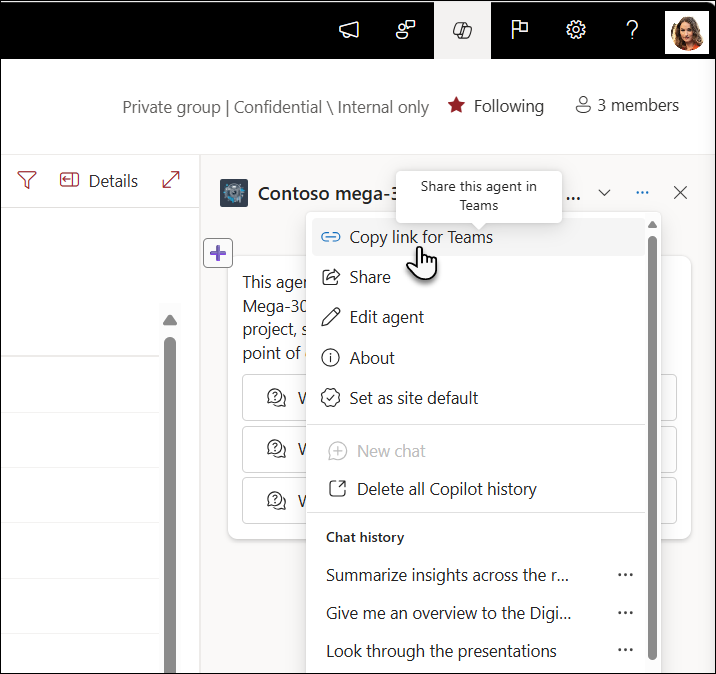
- Members of a project team can share a SharePoint Agent in their Teams channel to access their information and work documents more easily, collaborate more seamlessly, and achieve their goals more efficiently.
- A communications manager can use natural language to ask the chatbot to automatically generate a new intranet page , aligned with the visual identity and employer brand, and then improve a news post (tone, length, etc.) that will be published on that page.
- An HR manager can submit a query to SharePoint Knowledge Agent to generate a job posting or job description from the information contained in the company's HR database.
- An HR manager can use SharePoint's intelligent search to obtain a list of internal policies that will be impacted by the entry into force of new regulations, without having to search, open, read, and analyze all the reference resources.
- A site administrator can request SharePoint Knowledge Agent to receive optimization suggestions and automatically make relevant changes (classify documents by type, add an "author" or "summary" column, implement an approval procedure, etc.)
How does SharePoint Knowledge Agent work ?
SharePoint Knowledge Agents are easy to use, but they are only available to users with a Microsoft 365 Copilot license and those on a pay-as-you-go plan .
Licenses required to access SharePoint Knowledge Agent
To configure and use SharePoint Knowledge Agents, you must have a Microsoft 365 Copilot license and the necessary administrator privileges . If you do not have a Microsoft 365 Copilot license, you can access the SharePoint Knowledge Agent service by subscribing to a pay-as-you-go plan .
System requirements for deploying SharePoint Knowledge Agent
For SharePoint Knowledge Agents to be integrated with your intranet and document libraries, a site administrator or global administrator must configure this feature.
Good to know:
SharePoint Knowledge Agents are pre-built , non-customizable bots. To benefit from customized assistants that meet specific needs, administrators can create bespoke agents. To design a custom agent that facilitates the use of a document set, go to SharePoint, select files, then click "Create Agent" and customize your SharePoint Agent based on those sources.
You do n't need to be a developer to create a SharePoint Agent . Authorized users can therefore set up a custom AI assistant without any special coding skills.
Getting Started with SharePoint Knowledge Agent
SharePoint Knowledge Agents are easy for users to get started with. Employees can ask SharePoint Intelligent Assistants questions and search using natural language, either by typing or speaking. To launch the chatbot, they simply click the floating "SharePoint Knowledge Agent" button in the bottom right corner of their screen. They can then ask the assistant questions as if it were a human.
Note that in order for the "Knowledge Agent" icon to appear on SharePoint and for employees to be able to use the tool, they must have a Microsoft 365 Copilot license, and also be owners or members of the site in question.
What are the key features of SharePoint Knowledge Agent?
The basic functionalities of SharePoint Knowledge Agents fall into three main categories:
SharePoint site and page enhancement features
SharePoint Knowledge AI Agents help site administrators create and optimize the pages and portals they manage through features such as:
- Reporting broken links, outdated pages and content gaps ;
- Generating pages , sections and FAQs from prompts and templates;
- Suggestions for design ideas to improve intranet pages;
- The automatic creation of harmonious content.
Knowledge management streamlining features
SharePoint Knowledge Agents streamline and automate the organization of document libraries through knowledge management features such as:
- Automatic creation of columns based on file content;
- Simplified implementation of workflows and governance rules ;
- Creating library views to modify the display of documents.
SharePoint content management features
The Knowledge Agents conversational assistants integrated with SharePoint offer several features that facilitate access to information and the leveraging of internal knowledge , including:
- The instant generation of personalized and contextual responses (based on information contained in a document, library, page or site) to questions asked by users;
- The immediate generation of summaries (audio or written) from one or more documents or a page to grasp the essential points without having to open a multitude of files and study hundreds of pages;
- Visualizing the differences and similarities between two documents to compare them more quickly and spot errors or changes;
- The live generation of a FAQ (frequently asked questions) from a document to facilitate the transmission of key information.
.jpg)


.webp)

.jpeg)


