



Employee Directory
Connect employees instantly with rich SharePoint profiles and smart search.
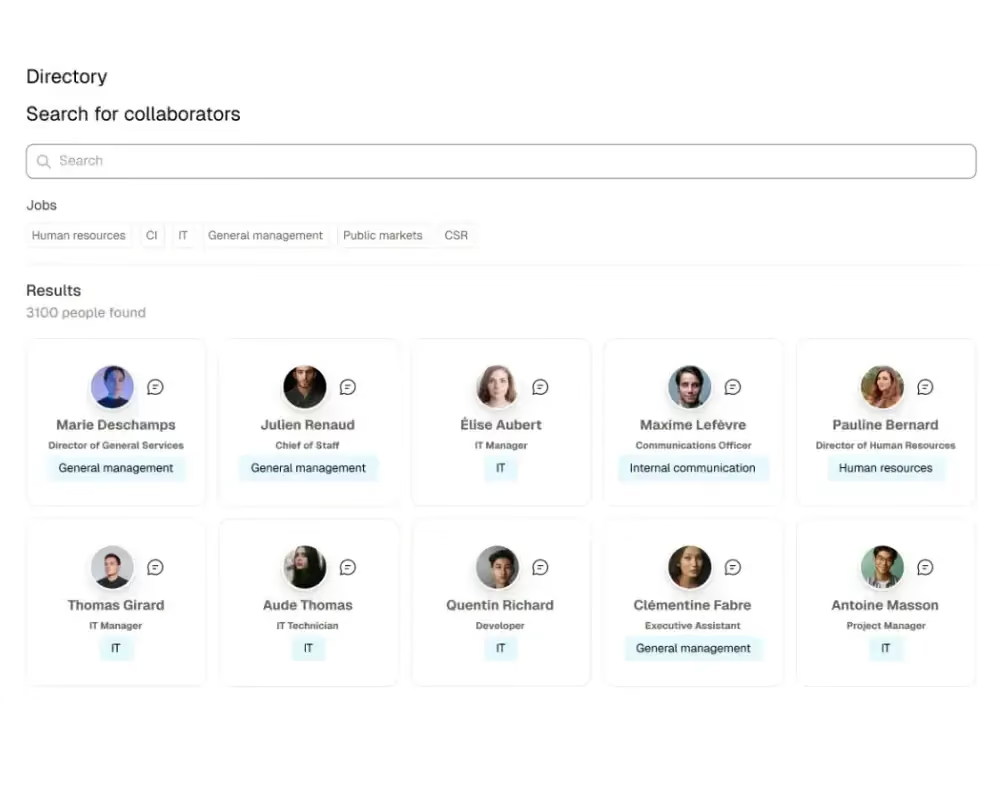
Connect with the right person, right away. We add rich profiles, advanced search, and better discoverability to the native Microsoft experience, making collaboration smoother across every department and site. Search by name, role, department, expertise, or location, and every profile field can be customized to match how your organization works, from certifications to internal mobility interests. Data syncs automatically with Azure AD or Microsoft Delve so information always stays current, and one-click contact via Teams or Outlook takes the friction out of reaching a colleague. A dedicated profile widget shows each employee their own key information, photo, job title, and department, with a quick edit button to keep it accurate, while rich contact cards display a person's role and details wherever they're referenced across the intranet. Add an org chart view so employees understand reporting lines, and give new hires a shortcut to find key contacts, experts, and their own manager from day one, instead of waiting on a wiki page nobody updates.


Frequently asked questions about Jint.
Can I search the directory by department, role, or location?

Yes, you can search by name, role, department, expertise, or location, and every profile field is customizable to match how your organization is structured.
Does the directory stay in sync with Azure AD?
Yes, profile data syncs automatically with Azure AD or Microsoft Delve, so information stays accurate without any manual updates.
Can employees contact each other directly from a profile?
Yes, a one-click link to Teams or Outlook lets employees reach out directly from any profile, without searching for contact details elsewhere.
Does the directory include an org chart view?
Yes, an org chart view shows reporting lines clearly, helping employees understand team structures and find the right hierarchy contact quickly.
Is the directory useful for onboarding new hires?
Yes, new employees get a fast, searchable way to find key contacts, experts, and their reporting line from day one, without waiting on an internal wiki.


