

🎉
Mozzaik becomes Jint — new identity, same mission.
Learn more
🎉
Mozzaik becomes Jint — new identity, same mission.
Learn more
🎉
Mozzaik becomes Jint — new identity, same mission.
Learn more
🎉
Mozzaik becomes Jint — new identity, same mission.
Learn more

Focus on the site directory

Florian Bouron
July 6, 2020
5 minutes
Jint Lookbook — inspirations for a modern and engaging Digital Workplace
Explore Effective Content Marketing Techniques
Get our free LookBook!

Table of content

Jint Intranet Specifications — guide to designing an effective intranet on Microsoft 365
Intranet specifications. Simple. Effective.
Download our free template

A component that centralizes both Yammer communities, Teams and SharePoint sites on the same interface? It's possible by integrating the Jint Site Directory component! This component allows you to save time and space by aggregating several types of common spaces such as :

Yammer communities linked to an Office365 group

  • The Teams working groups
  • Sharepoint (Classic or Modern) information spaces without an associated Office365 group

For these spaces to be listed and searchable, the user must at least be a reader or member of these spaces or discussion groups. Otherwise, they will not appear in the search engine, as it was not intended that these spaces and groups be discovered.

For each space is listed:

  • Its title or wording
  • The type of space
  • Links to the various key locations in the space

These links can come from a homepage of an associated SharePoint site, SharePoint documents, a Yammer discussion or a Teams group.

As for customisation, you can set the look of the search bar, the number of results to be displayed per page and the types of spaces you want to be displayed. Here is an example of a use case of the component in use:
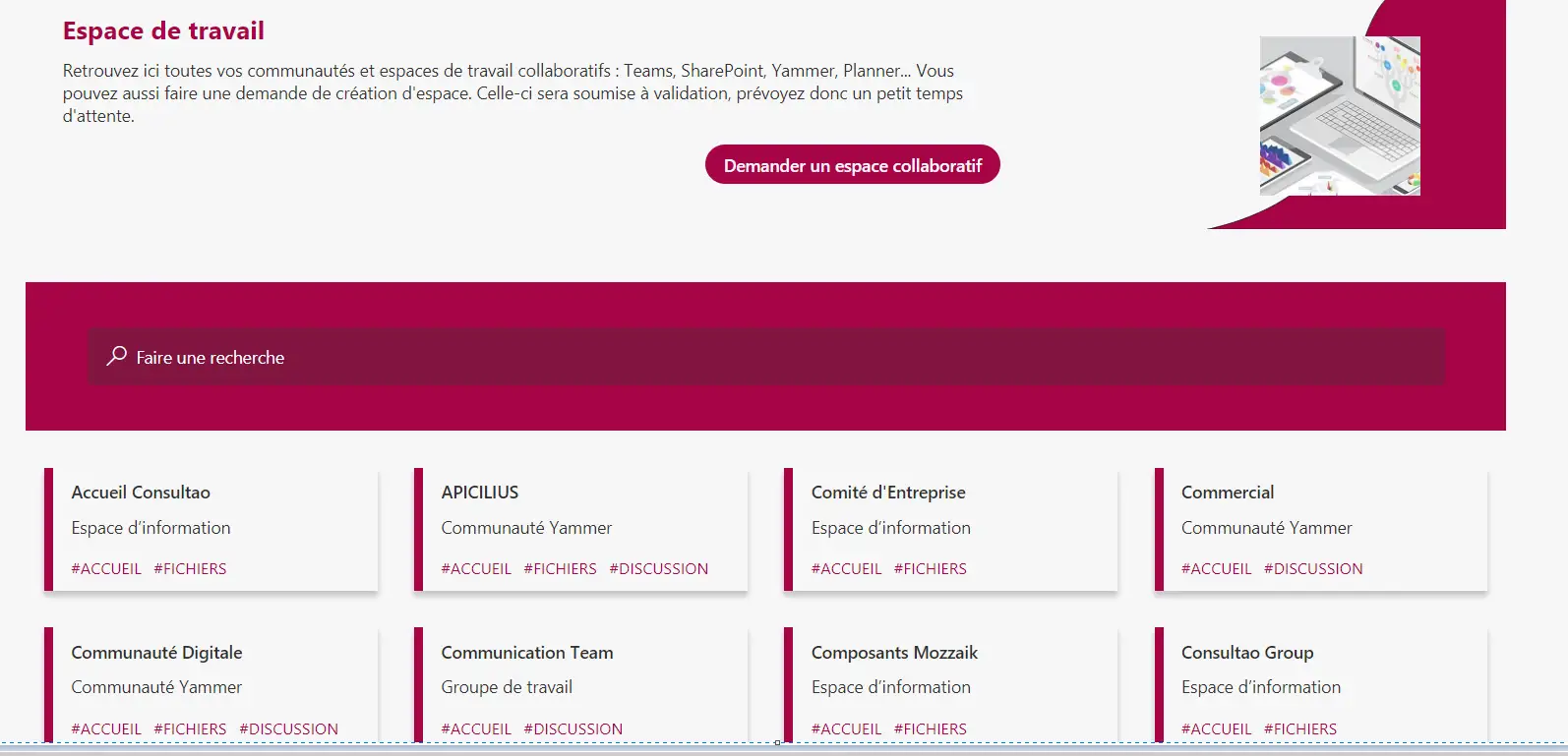
SharePoint : Site directory
Jint Intranet Specifications — guide to designing an effective intranet on Microsoft 365
Intranet specifications. Simple. Effective.
Download our free template
Author
Florian Bouron - CEO of Jint
Florian Bouron
Category
Digital Transformation
Published date
July 6, 2020
Share article

What is a digital workplace?

chevron down icon

A digital workplace is the unified environment where employees access all the tools, information and people they need to do their job, regardless of location or device. It's a strategic concept that integrates communication, collaboration, productivity tools, applications and knowledge into a single experience.

What are the benefits of a digital workplace?

chevron down icon

A modern digital workplace delivers measurable benefits: reduced time spent searching for information, fewer context switches between tools, higher employee engagement and retention, faster onboarding, better cross-team collaboration, and improved productivity. Studies show top-quartile organizations gain 20-30% in operational efficiency.

What makes Jint different from other intranet solutions?

chevron down icon

Unlike standalone intranet platforms, Jint is fully embedded in Microsoft 365. This means faster adoption, lower costs, and stronger security without needing additional infrastructure.

What tools make up a complete digital workplace in 2026?

chevron down icon

A complete digital workplace in 2026 combines a collaboration hub (Microsoft Teams), a content and intranet platform (SharePoint + Jint), a learning platform (Viva Learning), an employee experience layer (Viva suite), a mobile intranet for frontline workers, and an AI assistant (Microsoft 365 Copilot or Jint Genius). Security and identity management (Entra ID, Defender), analytics (Power BI), and workflow automation (Power Automate) complete the stack. The defining characteristic of a modern digital workplace is seamless integration between these layers so employees experience a unified environment rather than a collection of disconnected tools.

How do you measure the ROI of a digital workplace?

chevron down icon

Measuring digital workplace ROI requires linking platform adoption to business outcomes like productivity, onboarding speed, and employee retention. Track quantitative metrics—time saved per task, support ticket reduction, search success rate—alongside qualitative signals from employee satisfaction surveys. A before-and-after study during a 90-day rollout period provides the clearest baseline for calculating tangible ROI.

Don't miss these

More similar articles