






🧠 TL;DR: succeeding at internal communications in 2026
- Internal communication is a strategic priority in 2026: it drives engagement, productivity and retention.
- Most projects fail for 5 reasons: no targeting, scattered tools, no plan, poor UX, no measurement.
- 10 concrete strategies: segment audiences, leverage Microsoft 365, balance push/pull/social, structure a plan, engage without spamming, centralize on an intranet, polish UX, add multilingual support, use AI, measure impact.
- Deployment succeeds in 4 phases: framing, pilot, rollout, optimization.
- A single foundation (SharePoint intranet + mobile + AI) avoids fragmentation and makes communication measurable.
Internal communications is often the overlooked stepchild of corporate strategy. Yet its impact on engagement, productivity, and talent retention is massive and measurable. Here are 10 concrete practices to turn it into a genuine competitive advantage, within a Microsoft 365 environment.
The cost of inaction is quantified: according to Gallup (2024 State of the Global Workplace), low engagement costs the global economy about $8.9 trillion, or 9% of GDP. Internal communication is one of the first levers to reverse the trend.
Why Internal Communications Is a Strategic Priority in 2026
If you work in internal communications, you probably know this paradox well: you spend hours crafting messages, newsletters, intranet articles, and you have no real certainty that anyone read them. Meanwhile, your employees complain about drowning in notifications while never finding the information they actually need.
This isn't a question of bad intentions. It's a question of method and tooling.
The numbers speak for themselves:
- 74% of employees feel they lack essential information to do their jobs well.
- 60% of companies have no formalized internal communications strategy.
Roughly one third of corporate emails received are irrelevant to the recipient's work, generating that information overload that gradually pushes employees to tune out all communications, including the most important ones.
The direct consequence? According to Gallup's 2024 State of the Global Workplace report, only 23% of employees worldwide feel engaged in their organization. And a disengaged employee is statistically 18% less productive than an engaged colleague. In other words, internal communications is not a peripheral HR topic. It is a direct lever on business performance.
The good news: a 25% improvement in internal communications is enough to increase employee engagement by 20 to 25%. It is a project with a measurable ROI, and the numbers back it up.
The 5 Reasons Internal Communications Projects Fail
Before presenting solutions, it is worth honestly naming the most common failure causes. They show up in almost every organization.
1. Saturation : Too many emails, too many notifications, too many channels. At some point, employees simply tune out and stop listening.
2. Loss of impact : When the same message is sent to everyone without targeting, employee engagement drops.
3. Tool proliferation : Teams, intranet, email, sometimes even WhatsApp: nobody really knows where to look for information.
4. Lack of interaction : Communications remain strictly top-down, with no real feedback from teams.
5. Absence of personalization : Office workers and frontline employees are treated identically, despite their radically different realities.
These five causes have one thing in common: none of them are inevitable. Each has a concrete answer.
The 10 Internal Communications Strategies for High-Performance Teams in 2026
01 · Segment Your Audiences Based on Their Work Realities
The first reflex before building any internal communications strategy is clearly identifying who you are talking to. Two broad populations are generally distinguishable.

The desk-based employee, often hybrid office/remote, suffers from information overload and disorganization. They juggle Teams, emails, and the intranet, and can lose up to two hours a day just searching for information. For them, the priority is centralization and simplification.

The frontline worker, whether a retail associate, nurse, factory operator, or field technician, is not at a computer during their workday. They are often disconnected from headquarters and receive few relevant communications. For them, the primary channel is their mobile phone, often a personal device.
The golden rule: it is not your employees' job to adapt to the tool. It is the tool's job to adapt to them.
02 · Get the Most Out of the Microsoft 365 Ecosystem
Most organizations we work with already have all the right tools:
- Teams for messaging and collaboration
- SharePoint as the intranet backbone
- Outlook for targeted newsletters and communications
- Viva Engage for the internal social network
- OneDrive for document sharing
The problem is not a lack of tools. It is that they are used in silos, without any overarching strategy. What is missing is a coherent way to position all these tools together to form a genuine internal communications channel, rather than a loose collection of apps used haphazardly.
03 · Balance Push, Pull, and Social
An effective communications strategy rests on three complementary modes working in balance.
Push: the company sends information to the employee. Notifications, newsletters, featured SharePoint articles, Teams messages, digital signage. It is the most widely used mode and often the most poorly calibrated.
Pull: the employee seeks out information on their own when they need it. Intranet portal, mobile app, knowledge base. For this to work, the tool needs to be well-designed enough that people genuinely want to go there.
Social: information flows horizontally between colleagues, via Teams, Viva Engage, or any other internal social network. It is the digital word-of-mouth of your organization.
Leaning exclusively on push creates saturation. Leaning exclusively on pull, and nobody looks for information. Without social, you lose all employee engagement. The challenge lies in balancing all three.
04 · Build a Clear Internal Communications Plan
Before changing everything, identify what is already working. In every organization, some practices are working extremely well and we tend to undervalue them because we are always focused on what is broken. Maybe your SharePoint is an excellent document repository that everyone consults daily. That is exactly where your communications would get the most traction.
Then, create precise targeted audiences using the Microsoft directory (Entra ID): by department, location, and role. Plan your communications month by month, clearly defining which type of message goes through which channel, and resist the temptation to do everything at once.
05 · Engage Without Spamming
Each type of message has its appropriate format and channel.
Institutional communications (annual reports, leadership messages) belong in SharePoint articles, accessible and searchable over time. Use them as needed, for major announcements that deserve a permanent home on the intranet.
Activity summaries belong in a newsletter, sent on a regular cadence, monthly or biweekly. They give employees who rarely check the intranet a condensed, clear recap of what happened.
Urgent announcements go through notifications, but sparingly. Beyond two news notifications per day, employees disengage. The ideal is one notification per day, maximum.
Quick exchanges belong in Teams, used on an ongoing basis for fast, lightweight communication between colleagues and within teams.
Informal conversations should flow freely through your internal social network, without forcing or scripting them. Let them happen naturally.
Choosing your battles means deciding not to do everything. And that is exactly what makes the difference between success and noise.
06 · Build a Single Intranet Portal
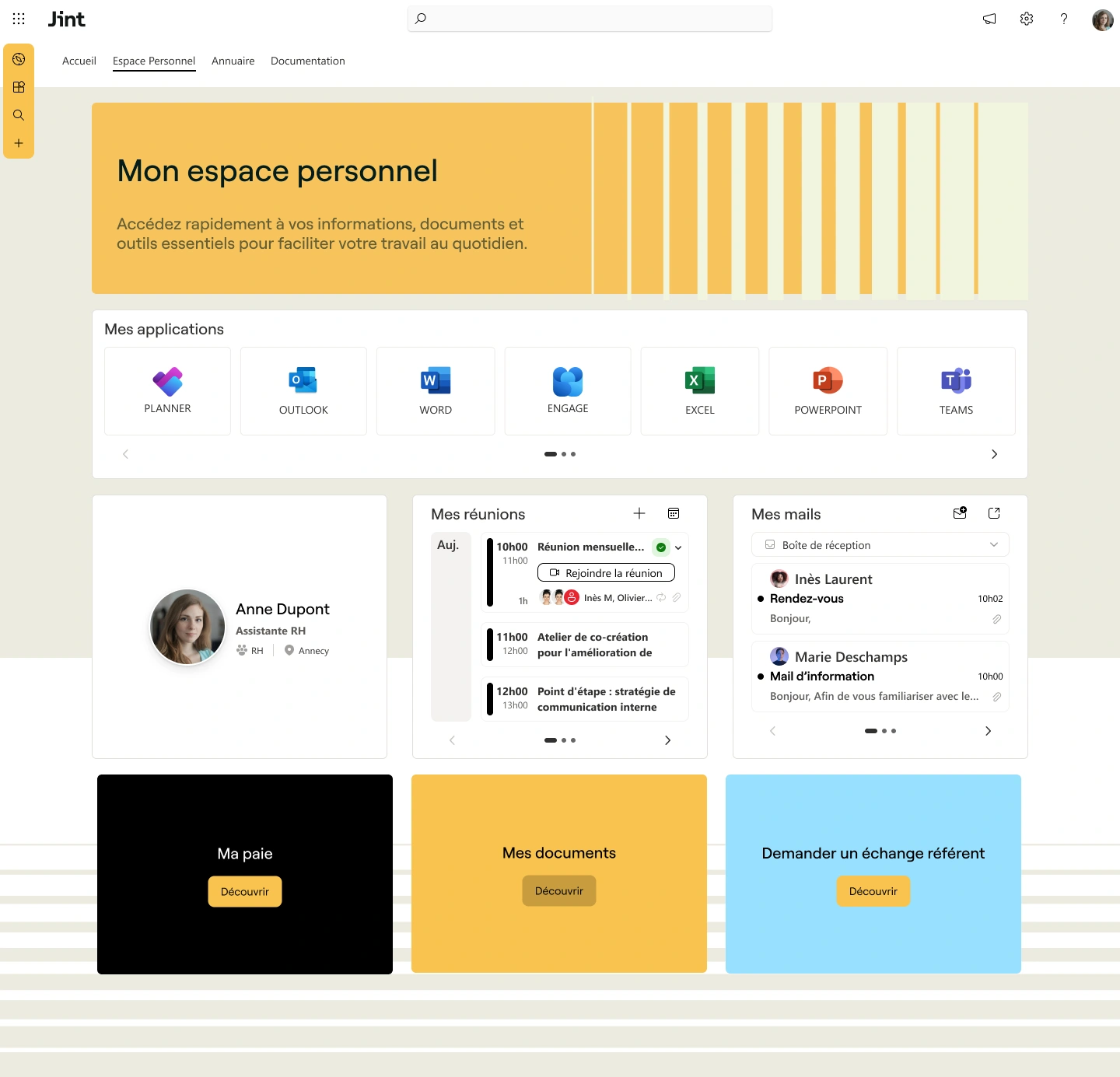
One of the most impactful transformations an organization can make is centralizing all resources, HR tools, news, and collaborative spaces into a single portal, also known as a one-stop shop or digital workplace.
The goal: make this portal the first thing an employee opens every morning, from their desktop, phone, or tablet, without friction. Company news, access to work tools, HR resources, document search, employee directory, all in one place.
A well-designed intranet portal creates usage naturally. And where usage exists, communications land. It is a virtuous cycle.
07 · Invest in User Experience
A functional but visually poor portal will not be adopted. The experience must be attractive, modern, and pleasant to use. That is a condition for adoption, not a luxury.
Well-designed newsletters, intuitive navigation, a consistent experience across all devices: these details determine whether your employees come back or not. A native SharePoint intranet, without customization, is often not very engaging. Tools that add a layer of design and ergonomics on top make a real difference in adoption rates.
08 · Embrace Multilingualism
In multinational and multilingual organizations, linguistic diversity is a daily reality. A modern internal communications tool must allow content, including articles, newsletters, and announcements, to be automatically translated into multiple languages in a few clicks.
One critical point: these translations must stay within your secure Microsoft tenant environment. Copy-pasting a confidential document into a consumer-grade AI tool means exposing sensitive data to unknown destinations. Tools integrated into Microsoft 365, powered by Azure AI, process your content without it ever leaving your organization.
09 · Use AI to Accelerate Content Creation
Generative artificial intelligence, integrated into your Microsoft environment, can reduce by up to 60% the time spent drafting internal content. It draws on your editorial guidelines, values, and internal style guides to produce content that is coherent with your company culture, not generic filler.
In practice, a communications professional can describe a topic in a few sentences, choose the desired tone, and receive a structured first draft ready to refine. Nothing is published automatically: human review remains systematic. AI is an accelerator, not an autopilot.
10 · Measure the Impact of Every Communication
Without data, you are working in the dark. A communicator who does not know whether their messages were read can neither improve nor demonstrate the value of their work to leadership.
The right tools give you access to precise metrics:
- Newsletter open rates
- Article view counts
- Clicks, reactions, comments
- Login rates to the portal by profile and by device
These data points let you identify what works, replicate what drives engagement, and build continuous improvement, the only path to genuinely effective internal communications.
How to Succeed at Deployment: A 4-Phase Method
Having the right tools is not enough. Implementation is equally decisive. Intranet projects that fail generally do not suffer from a technology problem. They suffer from a failure to integrate into actual working habits.
Phase 1 · Audit and Strategy Understanding how information actually flows in your organization, identifying existing usage patterns, mapping user profiles.
Phase 2 · Design and Architecture Building a space that is simple, clear, and intuitive, where the essentials are accessible in as few clicks as possible.
Phase 3 · Deployment Technical setup, data migration from legacy tools, configuration within Microsoft 365.
Phase 4 · Change Management Training users, identifying and mobilizing internal champions, supporting adoption over the long term. This is the most critical phase and the most underestimated.
Adoption rates jumping from 20% to 95% in a matter of weeks, it happens. But not without that fourth phase.
In Summary
Effective internal communications in 2026 is the combination of a clear strategy, well-used tools, and genuine attention to the experience of every employee, whether they are at a desk or in the field. Microsoft 365 provides all the necessary foundations. What makes the difference is how you articulate them, customize them, and support their adoption.
If you would like to assess your current environment and identify the priority levers for your organization, a 30-minute conversation with our team is often enough to bring things into focus.
.webp)


