







Here is an uncomfortable number. The average internal communicator is now accountable for seven KPIs, most of them shared with HR and the C-suite, yet many still cannot connect their metrics to real business outcomes (Gallagher, State of the Sector 2025). They have data. They just cannot prove the data means anything. That gap is exactly what a good SharePoint analytics tool closes.
If your intranet runs on SharePoint, you already sit on a goldmine of signals. The problem is reading them well. Let's break down what to measure, what SharePoint gives you for free, and which tools take you from counting clicks to proving impact.
What a SharePoint analytics tool actually measures
A SharePoint analytics tool tracks how employees interact with your intranet: which pages they read, which news they open, how long they stay, which web parts they use, and how that behavior trends over time. The good ones go one step further and tie that activity to a communication goal.
Which internal communication KPIs should you track in SharePoint?
The trap is mistaking activity for performance. A page view tells you a page loaded. It does not tell you the right people saw the message, understood it, or acted on it. So the metrics that matter for internal communication look like this:
- Reach: how many of your target audience were actually exposed to a message, not just total impressions.
- Read and engagement rate: time on page, scroll depth, likes and comments, the share of readers who engaged.
- Web part adoption: which intranet components people actually use, and which sit unseen below the fold.
- Sessions and active users: recurring visits and daily active users, the truest signal of an intranet that became a habit.
- Contribution ratio: reads versus posts versus reactions, a window into whether communication is one-way or shared.
Hold these in mind. They are the yardstick we use to judge every tool below.
SharePoint native analytics: a solid floor, a low ceiling
SharePoint and Microsoft 365 include analytics out of the box, at no extra cost and entirely inside your tenant. That is their biggest strength. You get site-level and page-level usage data: views, unique viewers, time spent, traffic over the last 90 days, plus document interactions (Microsoft, SharePoint site usage documentation, 2025).
Around it, Microsoft has built more. Microsoft 365 usage analytics surfaces adoption across the suite in a Power BI dashboard. Viva Amplify lets communicators run a campaign across email, SharePoint, Teams and Viva Engage, then compares views and engagement by channel. Microsoft Clarity adds heatmaps and session recordings for a free, behavioral view. Together, these Microsoft 365 analytics cost nothing and stay native to your environment.
So why does anyone buy more? Because native analytics are page-centric and fragmented. They tell you a page was viewed; they do not tell you the target audience saw it (Tryane, SharePoint analytics limitations for internal communication, 2025). Data is scattered across several screens, retention is limited, and reach by audience segment, the metric comms teams need most, simply is not there. Native is the floor. Few serious teams stop there.
The third-party tools, reviewed honestly
Once you outgrow native, the market splits into clear camps. None of these is "best" in the abstract. Each wins for a specific job.
Cross-channel platforms: Tryane
Tryane Communication Insights consolidates every internal channel, email, SharePoint, Viva Engage, newsletters, into one place and tracks audience activity through Microsoft APIs. If your communication lives across many channels and you need a single ROI story, this is the strongest fit. The trade-off: part of the data is processed in a dedicated SaaS platform, outside the native SharePoint experience.
Intranet engagement specialists: SWOOP and AvePoint tyGraph
SWOOP Analytics measures usage, engagement and content performance across SharePoint intranets, with benchmarks against other organizations, a genuine differentiator for teams that want to know how they compare (SWOOP Analytics, 2025). AvePoint tyGraph plays a similar role, with deep engagement and adoption reporting for Microsoft 365 intranets. Both are mature, both are paid, and both generally rely on a dedicated analytics platform.
IT and governance reporting: ManageEngine
ManageEngine SharePoint Manager Plus leans toward IT operations: usage reports, storage, governance and security auditing. It answers "is the platform healthy?" more than "is my communication working?". Useful for admins, less so for a communications team.
Jint Analytics: native to Microsoft 365, and your data never leaves home
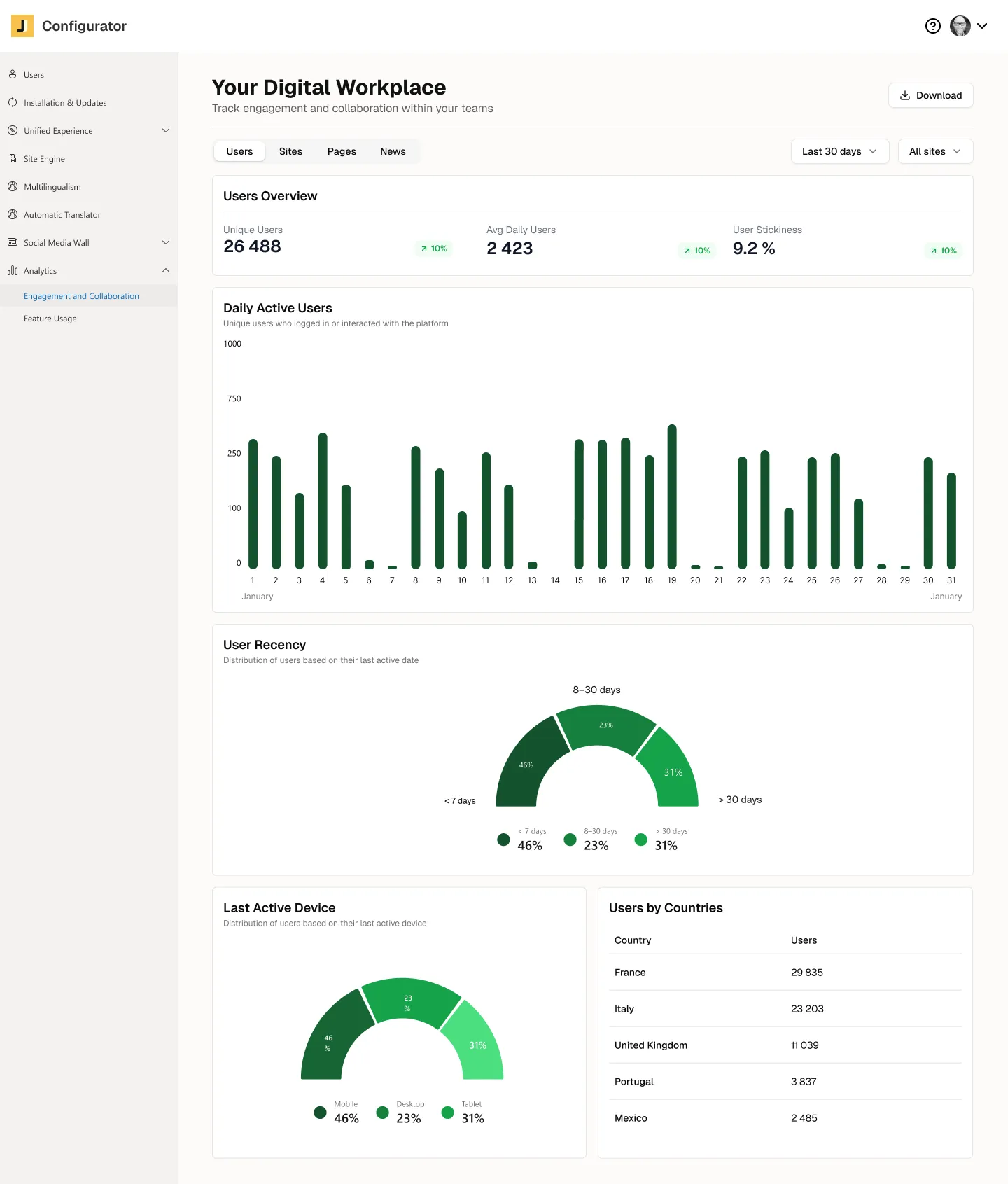
This is where Jint for SharePoint takes a different stance. Jint Analytics is built directly into Microsoft 365 as a native add-in, not a SaaS layer bolted on top. It measures the full picture of intranet activity, adoption and usage: web parts (views, adoption, interactions), Sites (most visited, active sites, sessions), News (active news, views, most viewed), Pages (page views, average views per page), Users (recency, device, country, stickiness) and Licenses (contracted versus used). Once the tracking package is installed, every SharePoint page is measured, not only pages carrying Jint web parts.
The defining difference is governance. Your data stays inside your own Microsoft 365 and Azure tenant. User identifiers are hashed and anonymized before processing, no IP addresses are collected, and everything is aggregated into audience statistics. For a CISO or IT leader, that single fact reframes the whole decision: you measure adoption while keeping analytics processing aligned with your Microsoft 365 and Azure environment. It is the answer to the question most analytics vendors hope you don't ask.
Name the trade-off plainly, because honesty is what makes a comparison useful. Jint Analytics is SharePoint-scoped: it is not a cross-channel email tool like Tryane, and because it is anonymized and aggregated, it does not do person-level "who read what" targeting the way a platform like Staffbase does. That is a deliberate privacy choice, not an accident. If your priority is in-tenant, GDPR-friendly measurement of your SharePoint intranet, it is hard to beat.
Jint Analytics is therefore not the best fit if your priority is to consolidate every channel beyond SharePoint into one cockpit. It becomes very relevant when your SharePoint intranet is the central channel of your internal communication.
SharePoint analytics tools compared
Here is the landscape at a glance, scored on the criteria that decide most real purchases.
Want to measure SharePoint intranet adoption without moving analytics data outside your Microsoft 365 environment? See how Jint for SharePoint works.

How to choose, by who is asking
The right tool depends less on feature checklists and more on who owns the decision.
- For IT and Security leaders: data residency wins. A native, in-tenant, anonymized tool removes a whole compliance conversation. You measure adoption without exporting employee data.
- For Internal Communications leaders: reach and engagement win. You need to prove a message landed with its audience and moved a behavior, across the channels you actually use.
- For HR leaders: frontline coverage and multilingual reach win. Measure whether deskless and field teams ever see the message, not just head office.
If you are still weighing the broader stack, our guide to the best internal communication tools and our intranet platforms comparison set the scene. For inspiration on what a measured intranet looks like in practice, see these SharePoint intranet examples.
Clean analytics are the foundation for AI
One more reason to get this right in 2026. Everyone wants AI agents and Copilot reading their intranet. But an agent is only as good as the information it can reach. If your content is scattered, stale or ungoverned, the agent hallucinates or returns nothing useful. Analytics are how you find the unread pages, the dead web parts and the content nobody trusts, then fix them. A well-measured, well-governed intranet is the foundation that makes AI actually work, not a competitor to it. Measurement first, intelligence next.
What to remember
- SharePoint native analytics are a free, in-tenant floor that measures activity, not communication performance.
- Third-party tools win on cross-channel reach (Tryane) or benchmarked engagement (SWOOP, AvePoint tyGraph), usually at the cost of moving your data into their cloud.
- Jint Analytics keeps measurement native to Microsoft 365 and anonymized inside your tenant, covering web parts, news, pages, sites and adoption.
- Choose on data residency and the metric your persona actually needs, not on the number of charts.

.webp)


