






TL;DR
- There are many types of intranets: internal communication, HR, document management, enterprise social network or app hub.
- Modern intranets often combine several uses to create a true digital workplace.
- Their form depends on the context: multi-site companies, public sector, industry, services or international organizations.
- Today's solutions frequently integrate with Microsoft 365, SharePoint and Teams to centralize tools and information.
- High-performing intranets rely on key modules: news, directory, document center, dashboards and collaborative spaces.
- A successful intranet redesign relies on user experience, easy access to information and team adoption.
The adoption stake is real: according to Gallup (2024 State of the Global Workplace), only 23% of employees feel engaged and low engagement costs about $8.9 trillion, or 9% of global GDP.
Communication intranet example
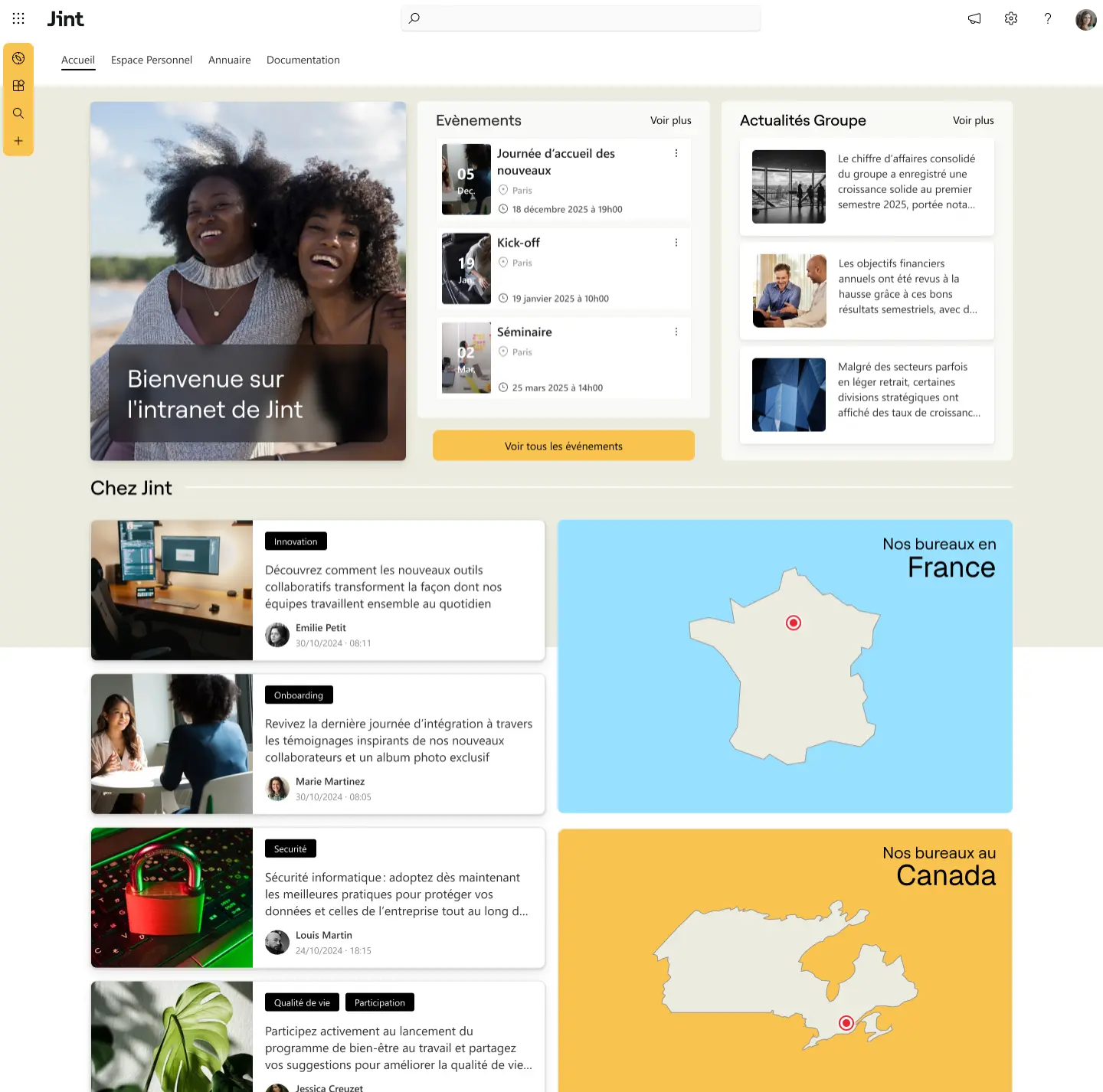
A communication intranet is designed to share internal information in a clear and centralized way. It lets employees follow company news, discover ongoing projects and stay informed about important events. By bringing together announcements, editorial content and strategic information in one place, this type of intranet becomes a true hub for internal communication.
Highlight news and important announcements
A communication intranet homepage usually highlights company news, key projects or leadership announcements. Employees can quickly access important information, whether it's a new project, financial results or an internal initiative.
Improve the flow of information across the organization
In multi-site organizations or growing companies, it can be hard to maintain a consistent level of information. The communication intranet helps structure how messages are distributed and ensures every employee, regardless of their team or location, has access to the same information.
Ideal for
Companies that want to structure their internal communication, relay strategic information and maintain a regular connection with employees spread across several teams or sites.
HR intranet example
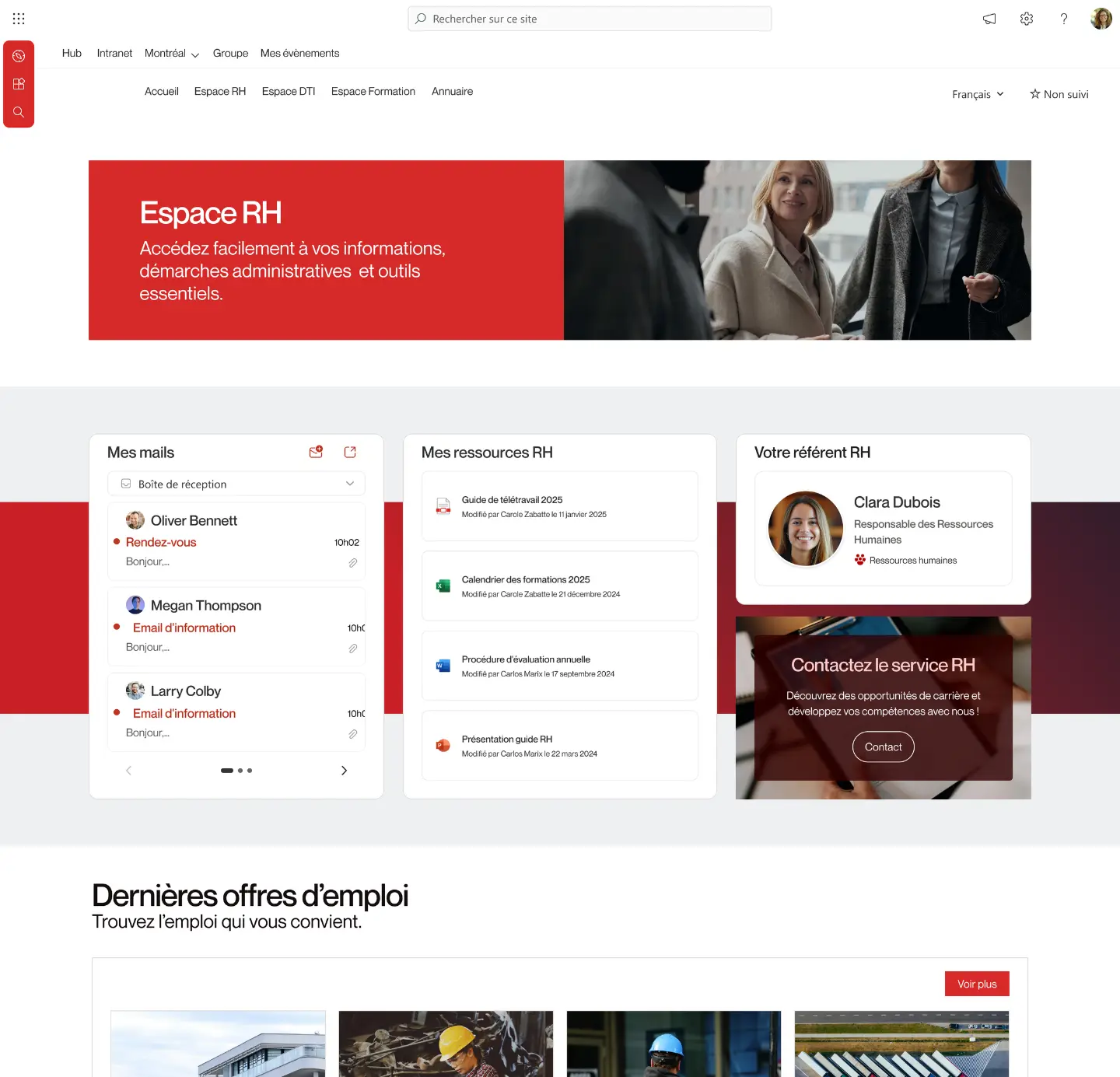
An HR intranet centralizes the information and services related to human resources to simplify employees' daily work. It provides quick access to essential features such as the internal directory, HR documents, administrative procedures or information about how the company is organized.
By gathering these resources in a single space, the HR intranet helps streamline exchanges between teams and the HR department, while making information easier to access.
Find colleagues easily with the internal directory
One of the key features of an HR intranet is the employee directory. It makes it easy to find a colleague, identify their role in the company or quickly reach the right person. Thanks to filters by department, job or location, teams can more easily identify the skills available across the organization.
Centralize HR resources and information
An HR intranet also brings together all the information useful to employees: administrative documents, internal procedures, leave information or guides for new hires. This reduces requests to the HR team while improving employee autonomy.
Ideal for
Companies that want to simplify access to HR information, make it easier for employees to connect and structure their internal organization through a directory and centralized resources.
Document management intranet example
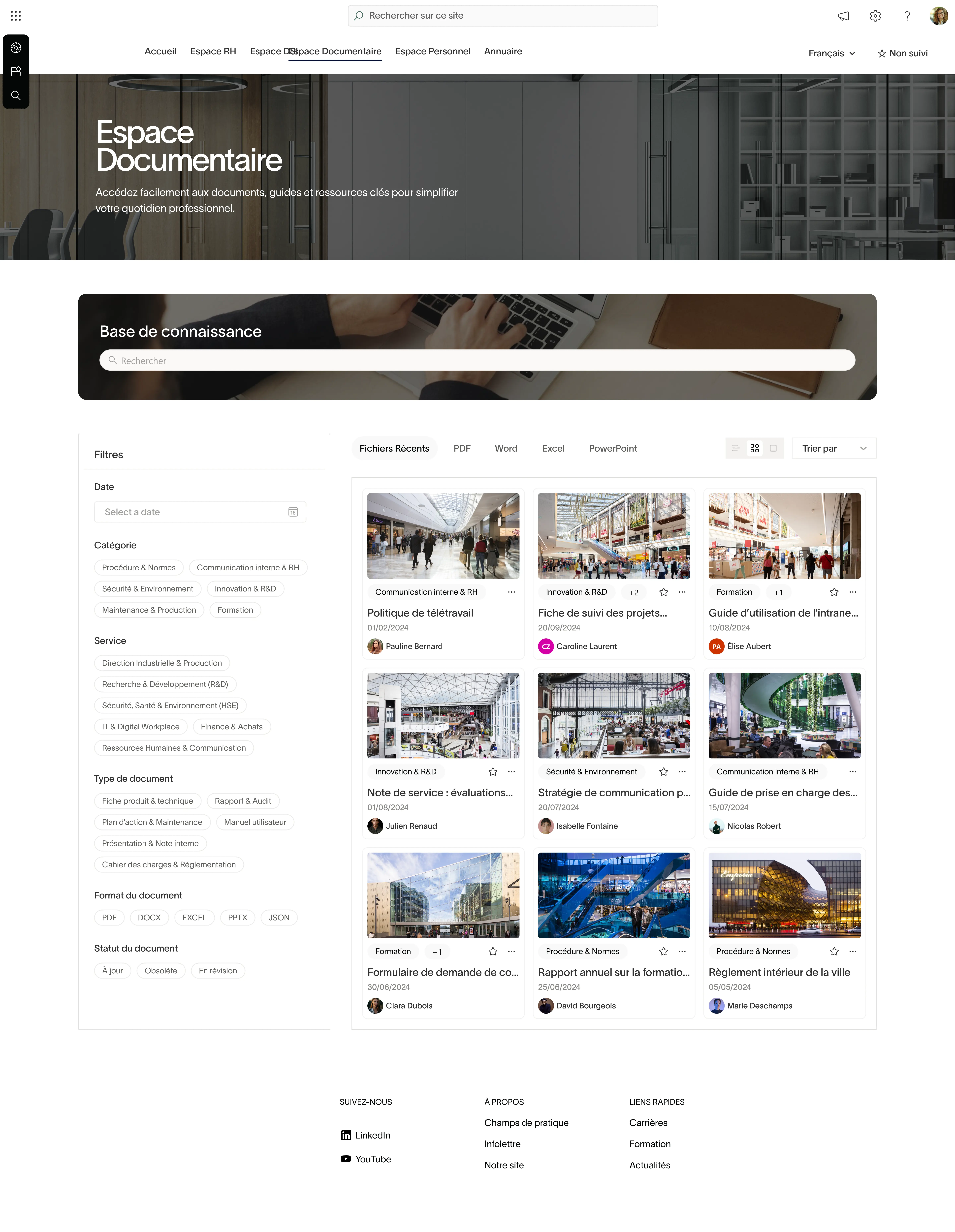
A document management intranet is designed to centralize all of the company's internal documents and resources. It lets employees easily find procedures, guides, document templates or business information without searching through several tools or shared folders.
Get inspired with the Intranet Lookbook
Explore a selection of modern intranet examples designed with Jint. This lookbook lets you browse different interfaces, page structures and modules to imagine your future intranet.
- Real intranet interface examples
- Inspiration for the homepage and employee spaces
- Design and usability best practices
By structuring content in an organized and easily searchable knowledge base, this type of intranet helps improve knowledge management and the distribution of internal information.
Structure and organize company documents
The document intranet usually offers a clear organization of content through categories, filters or topics. Employees can quickly access the resources they need, whether administrative documents, internal procedures or business materials.
Make search and access to information easier
An essential feature of the document intranet is advanced search. It makes it possible to quickly find a specific document using keywords, categories or tags. This reduces the time spent looking for information and improves day-to-day efficiency.
Ideal for
Organizations that want to structure their internal knowledge base and let employees easily access the documents, procedures and resources useful to their daily work.
Group intranet example
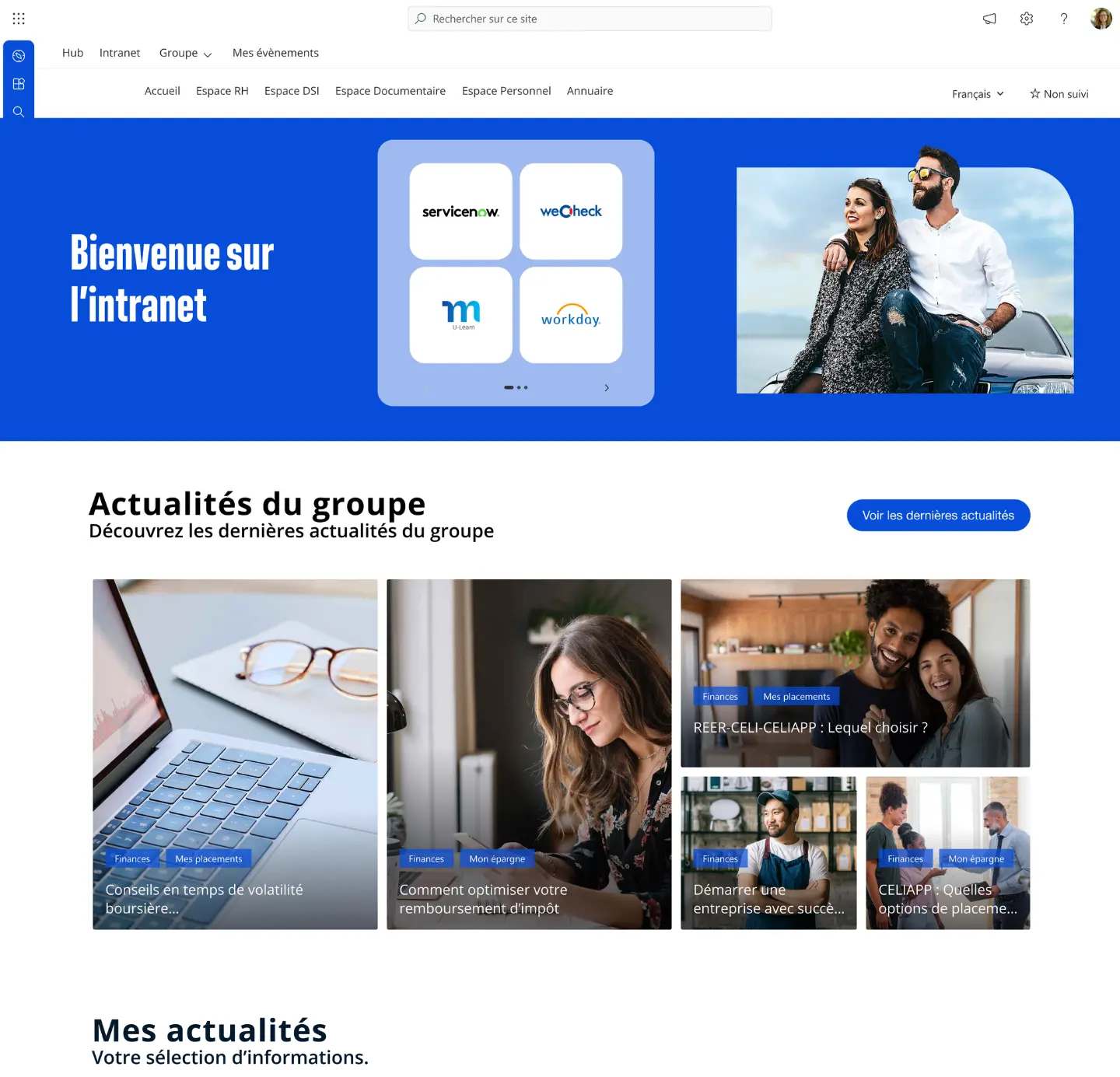
A group intranet is designed to connect the different entities of an organization, often spread across several countries, subsidiaries or business lines. It centralizes strategic information, shares group news and makes it easier to access the tools used by all employees.
In large companies or international organizations, this type of intranet plays a key role in maintaining consistent communication and strengthening the sense of belonging to the group.
Centralize information at group level
The group intranet distributes important announcements, company results, strategic initiatives or cross-functional projects. Employees can follow the group's progress and understand the organization's broad direction.
Connect the different entities and subsidiaries
In multi-site or international structures, the intranet eases the flow of information between entities. It builds bridges between teams, shares local initiatives and fosters collaboration across subsidiaries.
Ideal for
Multi-site or international organizations that want to connect their subsidiaries, harmonize internal communication and offer a single access point to group information and tools.
Intranet example for a city or local authority
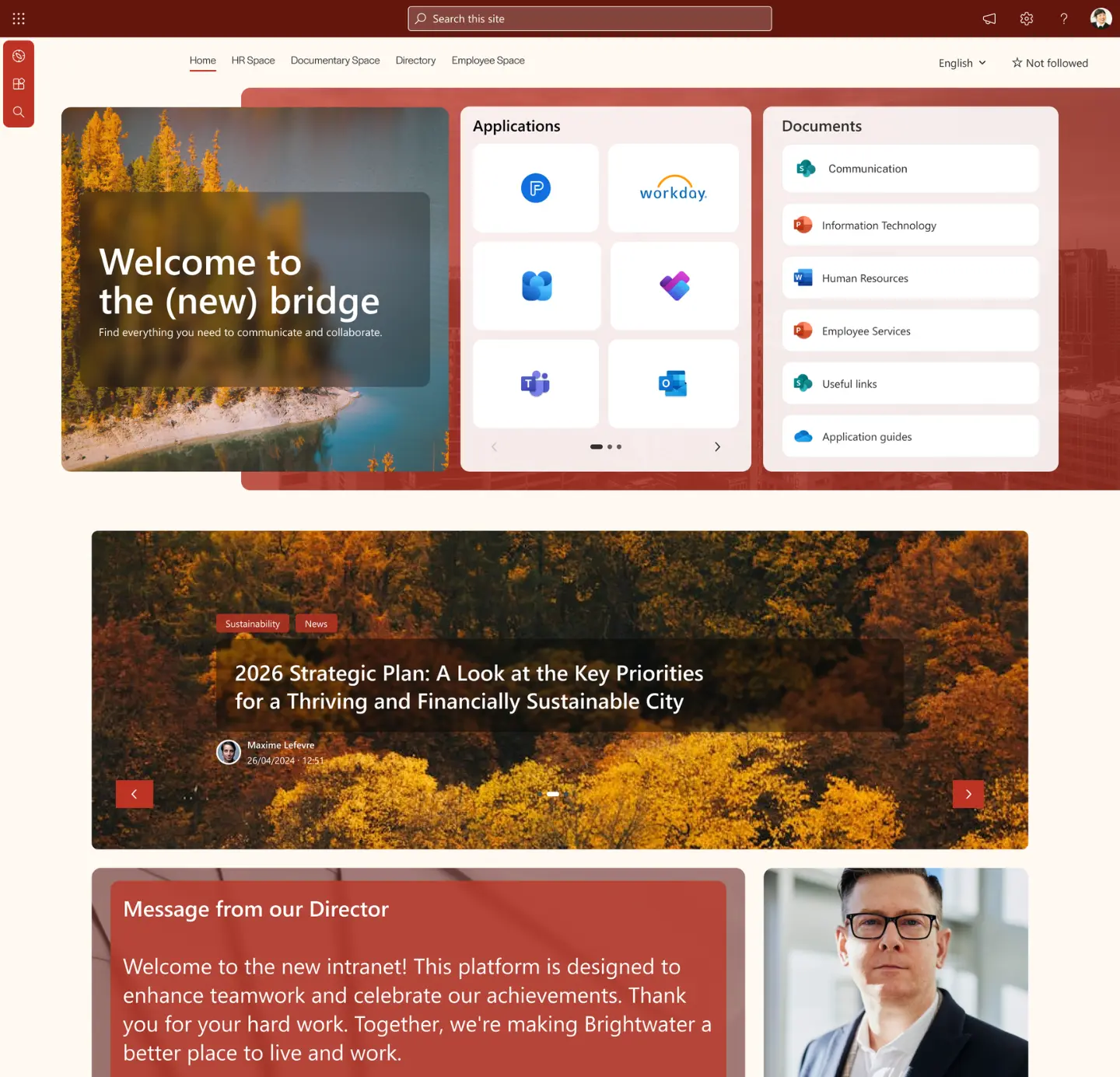
An intranet for a city or local authority centralizes the information and internal services intended for municipal staff. It eases communication between the different departments and gives staff quick access to the resources they need for their daily work.
In public organizations where teams are spread across several departments, buildings or sites, the intranet becomes an essential tool to share information, coordinate actions and simplify internal processes.
Connect the different municipal departments
Local authorities often bring together many departments: urban planning, human resources, communication, technical services, culture or education. The intranet helps ease the flow of information between these departments and share the projects or initiatives run within the authority.
Centralize resources and administrative processes
A municipal intranet can also offer direct access to internal documents, administrative procedures or the forms used by staff. This simplifies internal processes and makes information more accessible to all teams.
Ideal for
Local authorities that want to improve internal communication between departments, centralize administrative resources and give staff simple access to the city's tools and information.
Intranet example for service companies

In service companies, consulting firms, agencies and expert practices, the intranet plays a central role in structuring information and easing collaboration between teams. Employees often work on several projects in parallel and need quick access to resources, documents and internal expertise.
A business-services intranet centralizes key information, work tools and business knowledge, to improve team efficiency and smooth collaboration across departments.
Share internal resources and methodologies
Service companies often have many internal resources: methodologies, presentations, sales materials, studies or document templates. The intranet brings this content together in a structured space so teams can easily reuse it in their assignments.
Ease collaboration between project teams
Teams frequently work on cross-functional projects involving several areas of expertise. The intranet can offer dedicated project spaces, document-sharing areas or tools that make it easier to collaborate across teams.
Ideal for
Consulting firms, agencies or service companies that want to structure their knowledge base, ease resource sharing and improve collaboration between project teams.
Intranet example for industrial companies
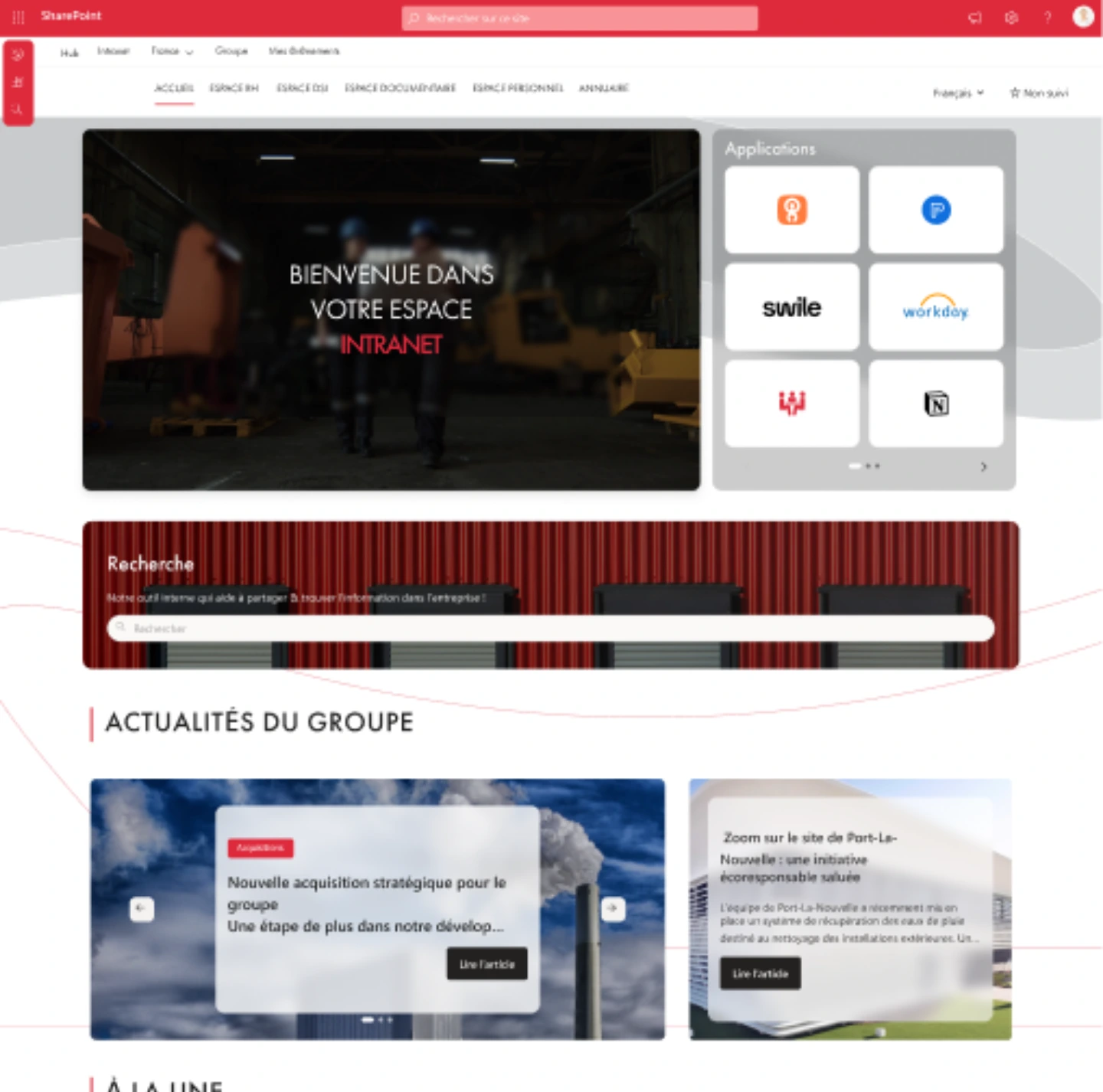
In industrial companies, the intranet is essential to share operational information and connect teams spread across different production sites. It gives employees quick access to company news, internal procedures or information related to safety and operations.
In environments where teams often work on the ground, the intranet becomes a key tool to maintain clear, structured communication between plants, support teams and management.
Share operational and safety information
In industry, some information must be shared quickly: safety procedures, operational instructions, technical updates or communication related to industrial projects. The intranet distributes this information in a centralized and accessible way.
Connect sites and field teams
Industrial companies are often organized around several sites or plants. The intranet shares local initiatives, best practices or results from each site to foster the flow of information and collective learning.
Ideal for
Multi-site industrial groups that want to improve communication between plants, share operational procedures and quickly distribute essential information to field teams.
Energy company intranet example

In the energy sector, the intranet connects teams spread across many sites: power plants, networks, technical offices or field teams. It distributes strategic information, shares operational instructions and eases access to the tools employees use every day.
In organizations that are often highly structured and heavily regulated, the intranet becomes a central access point to operational information, business resources and internal communications.
Quickly distribute critical information
Energy companies regularly need to communicate on important topics: facility maintenance, safety, infrastructure projects or regulatory changes. The intranet distributes this information quickly and in a structured way to all teams.
Provide access to technical tools and resources
Employees often need access to various business tools: operations tracking platforms, technical documentation, procedures or dashboards. The intranet brings these resources together in a single space to make them easier to access.
Ideal for
Energy-sector companies that want to connect their field and support teams, centralize operational information and ease access to the technical resources used every day.
Enterprise social network (ESN) intranet example
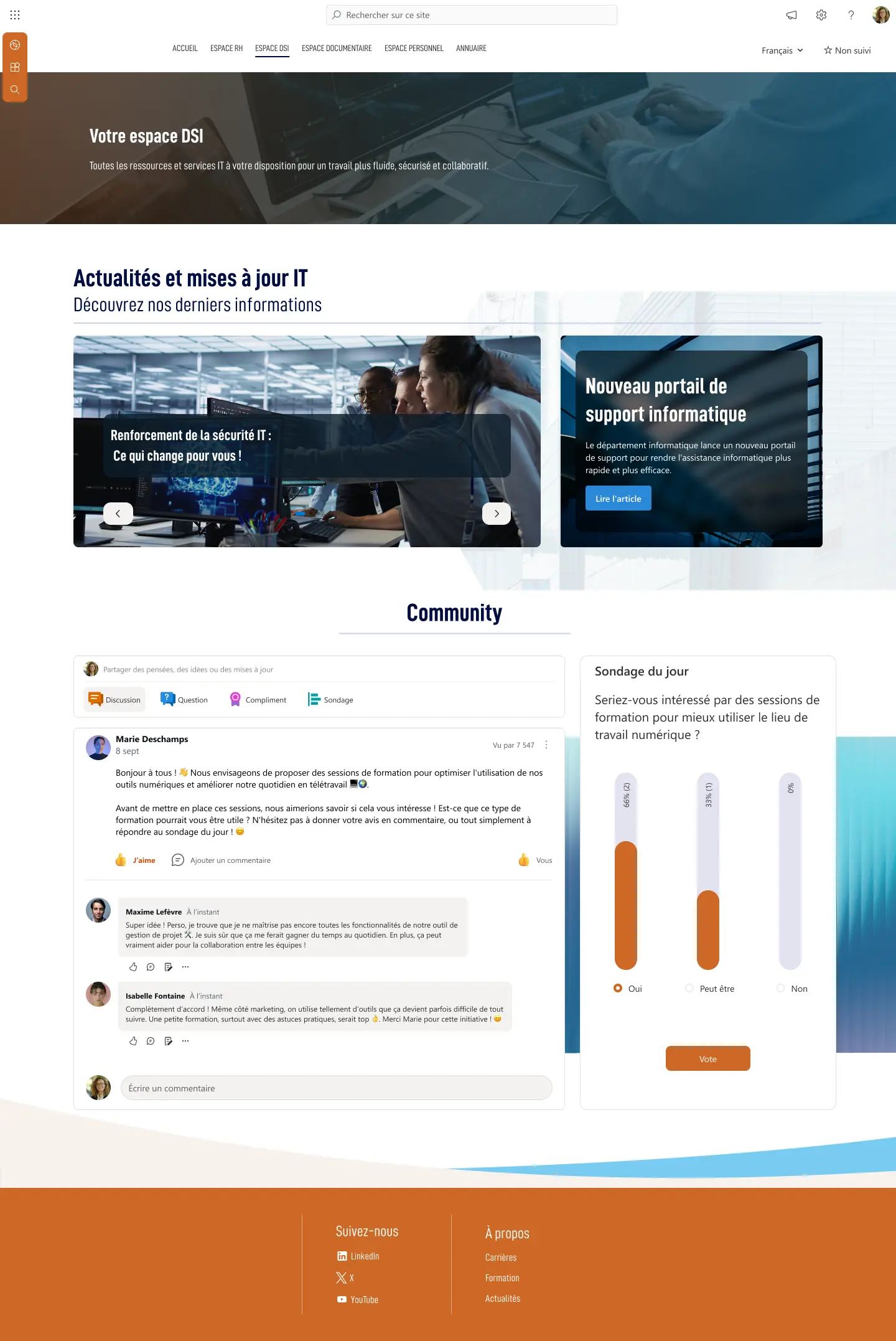
An enterprise social network (ESN) intranet is designed to encourage exchanges and collaboration between employees. Inspired by consumer social networks, it offers features such as a news feed, posts, comments or reactions to ease interactions within the organization.
Get inspired with the Intranet Lookbook
Explore a selection of modern intranet examples designed with Jint. This lookbook lets you browse different interfaces, page structures and modules to imagine your future intranet.
- Real intranet interface examples
- Inspiration for the homepage and employee spaces
- Design and usability best practices
This type of intranet helps develop more horizontal communication, where everyone can share information, ask questions or showcase team initiatives.
Encourage exchanges between employees
Through an internal discussion feed, employees can post messages, share content or react to their colleagues' posts. These interactions ease the flow of information and help build more connections between teams.
Develop internal communities
An ESN intranet also lets you create groups or communities around projects, jobs or interests. These spaces ease exchanges between employees who don't necessarily work in the same teams or on the same sites.
Ideal for
Organizations that want to strengthen employee engagement, encourage exchanges between teams and develop a more open culture of collaboration within the company.
SharePoint intranet example
A SharePoint intranet is an internal portal built on the Microsoft SharePoint platform. It centralizes internal communication, documents and collaboration tools in an environment integrated with the Microsoft 365 ecosystem. Thanks to its many features and flexibility, SharePoint is today one of the most widely used solutions to build corporate intranets.
By integrating with tools like Teams, Outlook, OneDrive or Viva, a SharePoint intranet connects the different work tools and creates a true digital space for employees.
Centralize content and documents
SharePoint makes it possible to create structured intranet sites with pages, document libraries and dedicated team spaces. Employees can easily access internal resources, share files and collaborate on documents.
Integrate with the Microsoft 365 ecosystem
One of the main advantages of a SharePoint intranet is its native integration with Microsoft 365 tools. Employees can access apps like Teams, OneDrive or Planner directly from the intranet, which simplifies their work environment.
Ideal for
Companies that already use Microsoft 365 and want to centralize their internal communication, documents and collaboration tools in an integrated environment.
Teams intranet example

A Teams intranet means bringing the intranet experience directly into Microsoft Teams, the collaboration tool employees use every day. Internal information, documents and resources are accessible from Teams, without switching between several apps. This approach brings the intranet closer to the teams' real work environment and makes adoption easier.
Solutions like Jint Teams turn Teams into a single access point to internal content, with personalized dashboards, widgets and ready-to-use modules to quickly reach company information, tools and news.
Access the intranet without leaving Microsoft Teams
With an intranet built into Teams, employees can read internal news, access documents or find their resources directly in the app they already use to collaborate. This limits tool switching and improves intranet adoption.
Personalize employee dashboards
A Teams intranet can offer personalized dashboards that bring together business apps, performance indicators or information useful to each employee. Every user gets a personalized access point to their work environment.
Ideal for
Companies that already use Microsoft Teams as their collaboration hub and want to turn it into a true portal for accessing internal information, apps and resources.
Onboarding intranet example
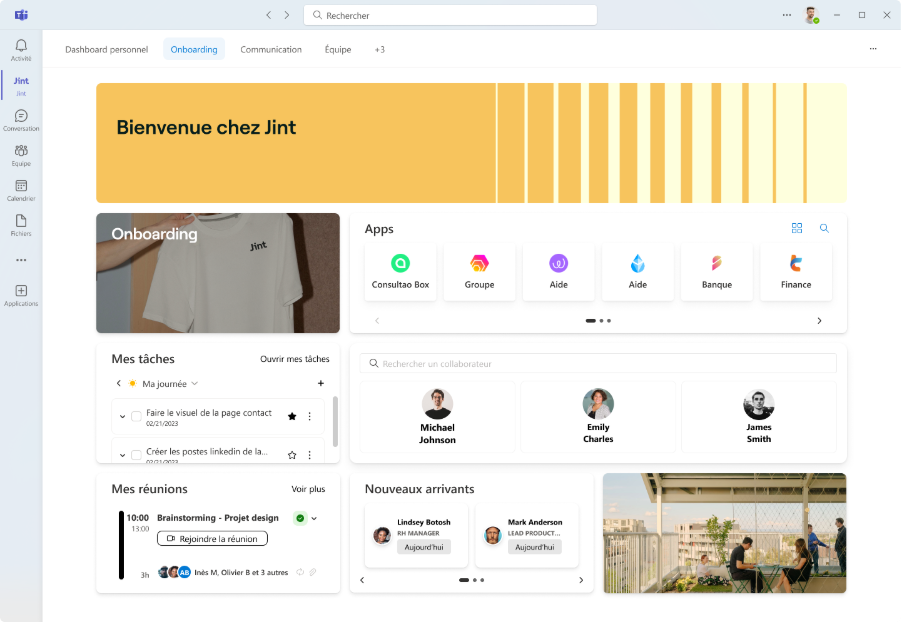
An onboarding intranet is designed to support new employees when they join the company. It centralizes all the information useful for the first days: company overview, internal resources, administrative steps or access to work tools.
This type of intranet structures the integration journey and makes it easier for new employees to get up to speed, while giving them a clear view of the company and how it works.
Structure the integration journey for new employees
An onboarding intranet can offer a guided journey with different steps: discovering the company, meeting the teams, accessing tools or training on internal processes. This journey lets new joiners progress step by step in their integration.
Provide access to essential resources and information
New employees can find important documents, key contacts, internal training or the information they need for their first weeks. This reduces uncertainty and helps teams become operational quickly.
Ideal for
Companies that want to improve the onboarding experience for new employees, structure their arrival journey and quickly give them access to the resources they need to get started.
Mobile intranet example
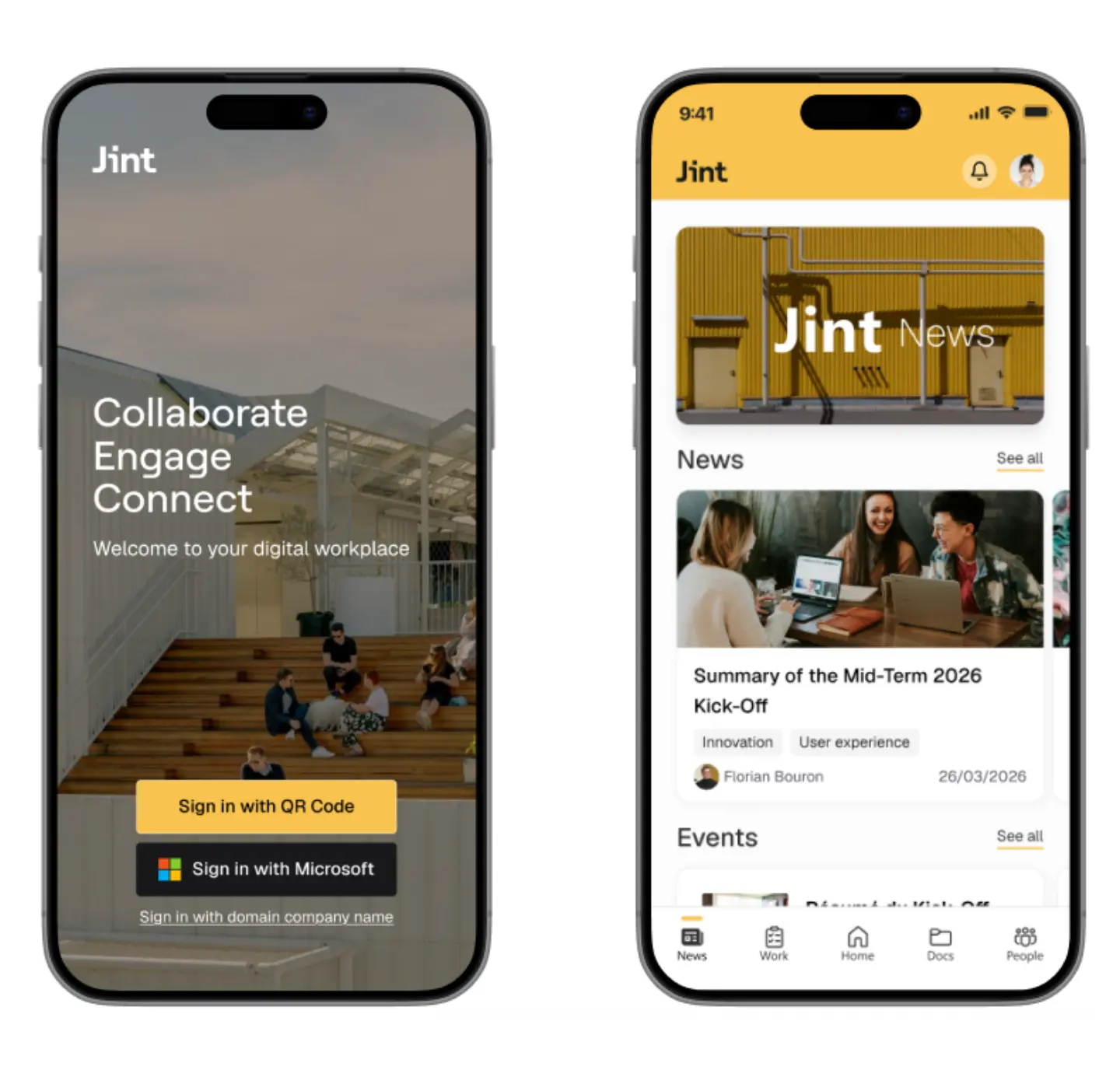
A mobile intranet lets employees access company information and tools directly from their smartphone or tablet. This approach meets the needs of organizations where teams don't always work behind a computer, such as industry, logistics, retail or field services.
Thanks to a mobile-friendly interface, employees can read internal news, access important documents or use certain business apps wherever they are.
Give access to information anywhere, anytime
A mobile intranet lets employees quickly check news, announcements or internal resources from their phone. This eases the flow of information, especially for teams working in the field or on the move.
Simplify access to internal tools and services
Some features can also be available from the mobile app: employee directory, HR requests, internal forms or access to certain business apps. The intranet becomes a practical tool accessible in every work situation.
Ideal for
Companies with field teams or mobile employees who need access to company information without using a fixed workstation.
Collaborative intranet example
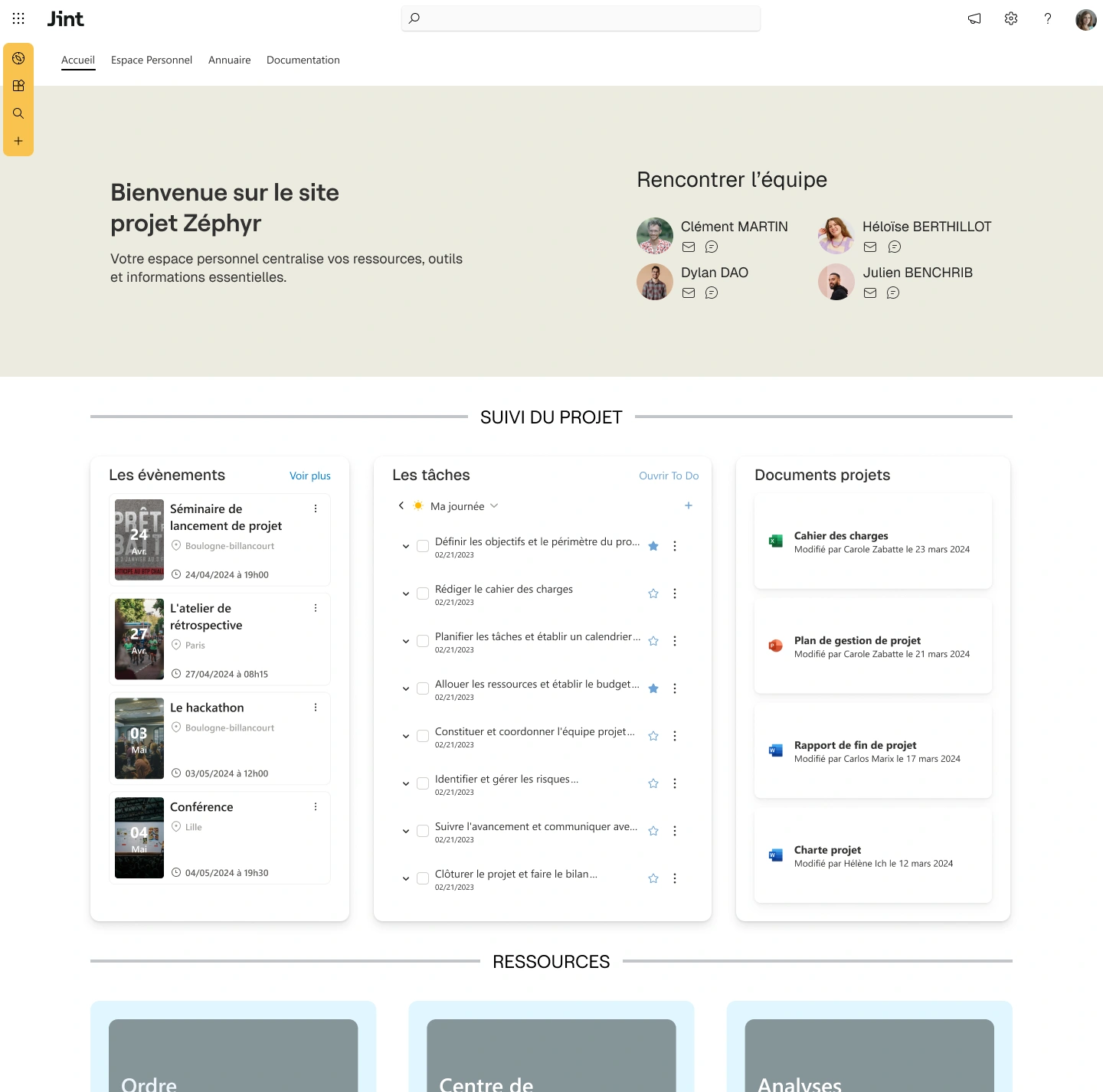
A collaborative intranet is designed to ease teamwork and coordination between employees. It offers shared workspaces where teams can exchange, manage projects, share documents or track the progress of their tasks.
Unlike an information-only intranet, the collaborative intranet lets employees work together within a single digital environment, bringing together the tools needed for project management and internal communication.
Create workspaces for teams
Teams can have spaces dedicated to their projects or activities. These spaces make it possible to share documents, organize discussions and track the different stages of a project.
Ease coordination and project tracking
A collaborative intranet can include task management, project tracking or file-sharing features. These tools help employees better coordinate their actions and keep a clear view of project progress.
Ideal for
Organizations that work in project mode and want to ease collaboration between teams, centralize exchanges and improve coordination around shared projects.
Examples of successful intranet projects
MFR reinvents its intranet with Jint
MFR reinvented its intranet with Jint to unify its 480 entities and give its 8,000 employees a collaborative platform accessible to every job.
"This new intranet is a real success. It is welcoming, accessible and constantly evolving. People genuinely enjoy using it. The best proof? I no longer receive any complaints. We have created something that works for every job."
Christophe Bernard,
CIO and Head of Communication, MFR
Nhood engages its employees across all its sites
Nhood built a multilingual Digital Workplace with Jint, successfully bringing together 1,300 employees across 11 countries around a platform used every day.
"Nhooders Place is no longer just an intranet, it has become a daily reflex. Everyone knows what it is, and more and more colleagues are asking to create their own team pages. We went from a small group of contributors to more than 70. That is a real sign of adoption."
Alexandra, Internal Communications & Employer Brand Manager
Useful features for your corporate intranet
A modern intranet relies on different modules that centralize information, simplify access to tools and improve collaboration between teams. By combining several features, communication, directory, dashboards or collaborative spaces, the intranet becomes a true digital work hub accessible to all employees.
Useful features for your intranet
| Feature | Benefit for employees |
|---|---|
| News wall | Share company announcements, projects and strategic information. |
| Employee directory | Quickly find the right person with rich profiles and advanced search. |
| Employee dashboard | Centralize apps, tasks and useful information on a single interface. |
| Internal newsletter | Easily send internal communications and keep teams informed. |
| Collaborative spaces | Create dedicated project spaces to share documents and discussions. |
| Advanced search | Quickly access internal documents, content and resources. |
| Microsoft 365 integration | Connect SharePoint, Teams and business tools in a single environment. |
| Mobile access | Read the intranet, documents and news from a smartphone or tablet. |
Intranet redesign: 5 best practices for a successful project
Redesigning an intranet is often a chance to modernize internal tools and improve the employee experience. But for an intranet project to truly be adopted by teams, changing the interface or the technology is not enough: you need to rethink uses, content and how information is organized.
Here are five best practices to successfully redesign your intranet and build a platform that is genuinely useful day to day.
1. Identify employee needs
Before launching a redesign, it is essential to understand how the intranet is used today and what teams need. Interviews, surveys or workshops can help identify pain points and the most expected features.
2. Simplify access to information
An effective intranet must let people quickly find the information they are looking for. A clear architecture, a powerful search engine and a logical content organization are essential to improve the user experience.
3. Highlight essential content
The homepage should highlight important information: news, access to apps, useful resources or ongoing projects. A clear content hierarchy lets employees quickly identify what is relevant to them.
4. Drive adoption across teams
Even the best intranet is only useful if it is used. So it is important to support its rollout with internal communication, demos or training to help employees take ownership of the tool.
5. Design an evolving intranet
Company needs change over time. An intranet must therefore be able to integrate new features, new modules or new uses to stay relevant in the long term.
Key takeaway
A successful intranet redesign relies on a user-centered approach: understand their needs, simplify access to information and offer a flexible tool that evolves with the organization.
Create a corporate intranet that reflects your brand with Jint
These examples illustrate the benefits of a corporate intranet. With its ready-to-use modules and flexibility, Jint helps companies quickly deploy an intranet tailored to their needs, while offering a smooth experience for teams.
A modular, customizable homepage
A Jint intranet homepage can be fully customized to highlight the information and tools most useful to employees. Widgets, news, app access or dashboards can be arranged to fit each organization.
Native integration with Microsoft 365
Jint integrates naturally with Microsoft 365 tools such as SharePoint, Teams or OneDrive. This integration connects documents, collaborative spaces and business apps in a single environment.
Ready-to-use modules to speed up deployment
Internal news, employee directory, dashboards, collaborative spaces or document center: Jint offers several modules to quickly build a complete intranet without complex development.
An employee experience built for adoption
The intuitive interface and use-oriented features make adoption easier for teams. Employees can easily access the information, tools and resources they need every day.
A scalable solution to support growth
Companies can grow their intranet over time by adding new modules or adapting the platform to new uses. Jint helps build a durable intranet that supports the organization's transformations.
Discover Jint SharePoint
Jint SharePoint turns Microsoft SharePoint into a modern, engaging intranet, ready to use for internal communication and collaboration.
- Web parts designed to boost employee engagement
- A structured and intuitive intranet
- A clear, organized document base
- A single space with endless possibilities

.jpg)


