





🧠 TL;DR: 20 features to integrate
- Every company has its own intranet: these 20 features cover most needs.
- They range from personalization to targeted news, directory and social.
- Choose based on your usage rather than switching everything on at once.
- On Microsoft 365, Jint delivers these features ready to use, no development.
Convinced of the benefits of a corporate intranet for collaboration and internal communication within your organization, you have started to design your own private network. Before you list features, make sure everyone shares the same picture of how an intranet works: identity, permissions, targeted news and search.
During this phase of writing your specifications, you wonder about the different features to integrate into your corporate intranet . The possibilities are indeed numerous.
To help you in your approach, Jint presents a selection of 20 features to add to your corporate intranet to improve collaboration and internal communication within your structure.
Read the following carefully and be inspired!
Usage evolves with AI: according to Microsoft's 2024 Work Trend Index, 75% of knowledge workers already use generative AI at work.
Each company has its own intranet (features)
In a previous article, Jint presented you different examples of corporate intranet and gave you its best advice to create your own Digital Workplace.
Let us recall at this stage that there is no single model of corporate intranet.
The corporate intranet, a tool to be customized
And for good reason: each organization is unique and has its own way of operating, its own culture, its own market and, of course, its own internal issues.
Some organizations, like large retail groups, need to facilitate communication with their field teams. For others, such as companies in the banking sector, the challenge is more to secure their exchanges, especially in hybrid work situations.
When it comes to setting up its own intranet, each company must therefore carefully select its features in order to design an internal site that corresponds precisely to its specific constraints.
One or more corporate intranets?
Moreover, an organization can equip itself with several intranets, in order to respond to different internal issues.
For example, a company can set up an intranet dedicated to its internal communication, another dedicated to HR information and another to document a project. These intranets are complementary and must allow easy navigation from one to the other to create a fluid and clear global experience for the user; the whole forming a seamless ecosystem: a Digital Workplace.)
But, in concrete terms, how do you go about designing the intranet or intranets that will make your structure run more smoothly and meet the various specific needs of your company?
SharePoint, the application to create corporate intranets on your terms
To create the intranet site (s) your company needs, you can rely on the Microsoft SharePoint application. This software allows you to easily build customized digital workspaces.
In concrete terms, with SharePoint, you can build intranet sites. But that's not all. You can also enhance your sites with various features. To do this, you need to add and configure the Web Parts of your choice.
But before you configure your Web Parts, you first need to choose the right CMS for your intranet, a critical decision that will determine all the features you’ll be able to enable later on.
☝️Jint's advice: setting up a Digital Worplace is a demanding and sometimes complex exercise. Therefore, think about being accompanied by an integrator. This expert will notably help you identify the needs of your teams and translate them into features that you can add to your corporate intranet.
With these basics in mind, let's move on to the presentation of the best features to integrate into your corporate intranet to make it an effective tool for collaboration and internal communication.
Customize your internal site with your corporate colors
The visual identity of your organization is an important lever of internal communication. It contributes indeed to the diffusion of the culture and the values of your structure to your teams. It is therefore essential to opt for an intranet that adapts to your graphic charter (logos, colors, images, etc.).
The native version of SharePoint offers limited design possibilities. Jint SharePoint pushes these limits and allows you to create an internal site with an aesthetic impact. You can apply a theme to your intranet sites to customize the design while maintaining consistency across your pages. Thanks to this feature, employees clearly identify the workspace in which they are located and become imbued with the visual identity of their company.
Create a custom news gallery
Did you know that? According to an Inside-OpinionWay survey, 1/3 of the employees questioned consider themselves "badly informed" within their company and 20% even declare "not having the information they need to do their job". An intranet dedicated to internal communication can alleviate this problem since it is an effective information channel.
To fully ensure its media function, the intranet must present a news gallery. The Jint SharePoint thus integrates a "News Wall" module. This module allows you to create in a few clicks beautiful blog articles that make you want to read them. It is also possible to add images, videos and clickable links to them. All of which makes for attractive and memorable content!
Even better, Jint's "News Wall" offers advanced features that enhance employee engagement. Indeed, the contents which are diffused there can be targeted to a precise audience. In addition, each user can customize their own news wall by subscribing to the topics of their choice. Finally, employees can react to the news.
The icing on the cake, the "News Wall" module of the Jint SharePoint also has an impactful design .

Allow employees to comment on content published by the company
With the right features, your corporate intranet can improve not only top-down internal communication, but also bottom-up and cross-functional internal communication. In short, your private site is a great way to interact with employees and increase their engagement.
To encourage exchanges between your group's stakeholders, be sure to add a feature to your intranet that allows employees to comment on articles and other shared content. The Jint SharePoint offers such an option. Users can be allowed to react to posts made by the internal communications department on the organization's "News Wall.
Distribute content in a targeted manner
Employees are too often victims of information overload. This infobesity can harm their productivity, increase their stress and lead them to burn-out. According to Nadia Boukef, quoted by Caroline Sauvajol-Rialland, 74% of the managers questioned said they "suffer from information overload and a generalized sense of urgency".
When it is well designed, the corporate intranet provides an appropriate response to this internal communication issue. In this respect, the "News" component of the Jint SharePoint integrates a feature allowing to target the populations that will receive information. The objective: send the right message to the right person at the right time and, in fine, preserve the available brain time of the employees (and their nerves!).
Thanks to this feature, news related to finance can, for example, be relayed exclusively to the "Controlling" department and the announcement of a new transport provider only to the "Logistics" department.
Better yet, with such a tool, it becomes possible to adapt the same message to different user profiles. For example, the CEO's New Year's greetings can be sent in video format (more easily consumed on a Smartphone) to field teams and in written form, with a PowerPoint, to employees at headquarters.
Integrate Microsoft Teams internal collaboration application
With no less than 270 million monthly users worldwide, the internal collaboration application Microsoft Teams is now an indispensable tool for many organizations. To improve internal collaboration within your structure, it is strongly recommended that you add this tool to your private network.
By integrating Teams and SharePoint with your corporate intranet, you centralize all communication and project management tools (Microsoft Planner, Task, ToDo, etc.) in a seamless environment. With this feature, offered by Jint SharePoint, you optimize your employees' user experience and facilitate collaborative work.
Provide access to documents
Attachments that get lost, failed downloads, recipient errors, etc. Document sharing is a major issue in internal communication and collaboration, and even a security issue. The solution to simplify this process? A corporate intranet with a feature to store, order and access files in a seamless and secure manner.
Jint, based on SharePoint, allows you to create an EDM (Electronic Document Management) completely integrated to your Digital Workplace. With this feature, you can centralize your company's knowledge, make it available to all your employees and allow each employee to enrich the content to build a real knowledge base.
Better yet, with Jint's Search component, employees can find the content they need to work with at a glance. In addition, with shared document storage on SharePoint, employees can work asynchronously on the same file and view its modification history. This makes it possible to collaborate more efficiently, especially in hybrid work situations.
More broadly, this is what it means to control the full lifecycle of a document — from its (co-)creation to its archiving, through editing, sharing and storage. Turning a SharePoint site into a proper EDM is what separates a real knowledge base from a folder tree nobody trusts.

Display a dynamic Who's Who
The corporate directory is a valuable support for new talent and for employees of large organizations. It allows you to put names to faces, identify roles and get in touch with colleagues quickly. It is therefore a basic tool for internal collaboration.
📍To go further on this topic, find out why the corporate directory is an essential for your internal collaboration.
Based on this observation, we recommend that you integrate a "Dynamic Who's Who" feature into your corporate intranet. This component, proposed by Jint, allows you to reference employees, and also to search for people by name, department, function or skills, and even to apply filters and make contact in one click. The ideal way to quickly find the right contact and move forward on your projects.
Create shortcuts
To improve internal collaboration and user experience, turn your private network into a true hub that opens up to all the resources and software your teams need. This way, employees will never again be "lost" in your company's digital environment.
In this perspective, your company intranet must include a feature allowing to create shortcuts. You can then set up links to business tools, websites, files and other intranet pages useful to employees. The Jint SharePoint offers this possibility.
Jint offers an "Application Launcher". Thanks to this feature, links to applications useful to employees appear directly in the Digital Workplace. This way, employees know which tool to use and do not get lost in the multitude of existing applications.
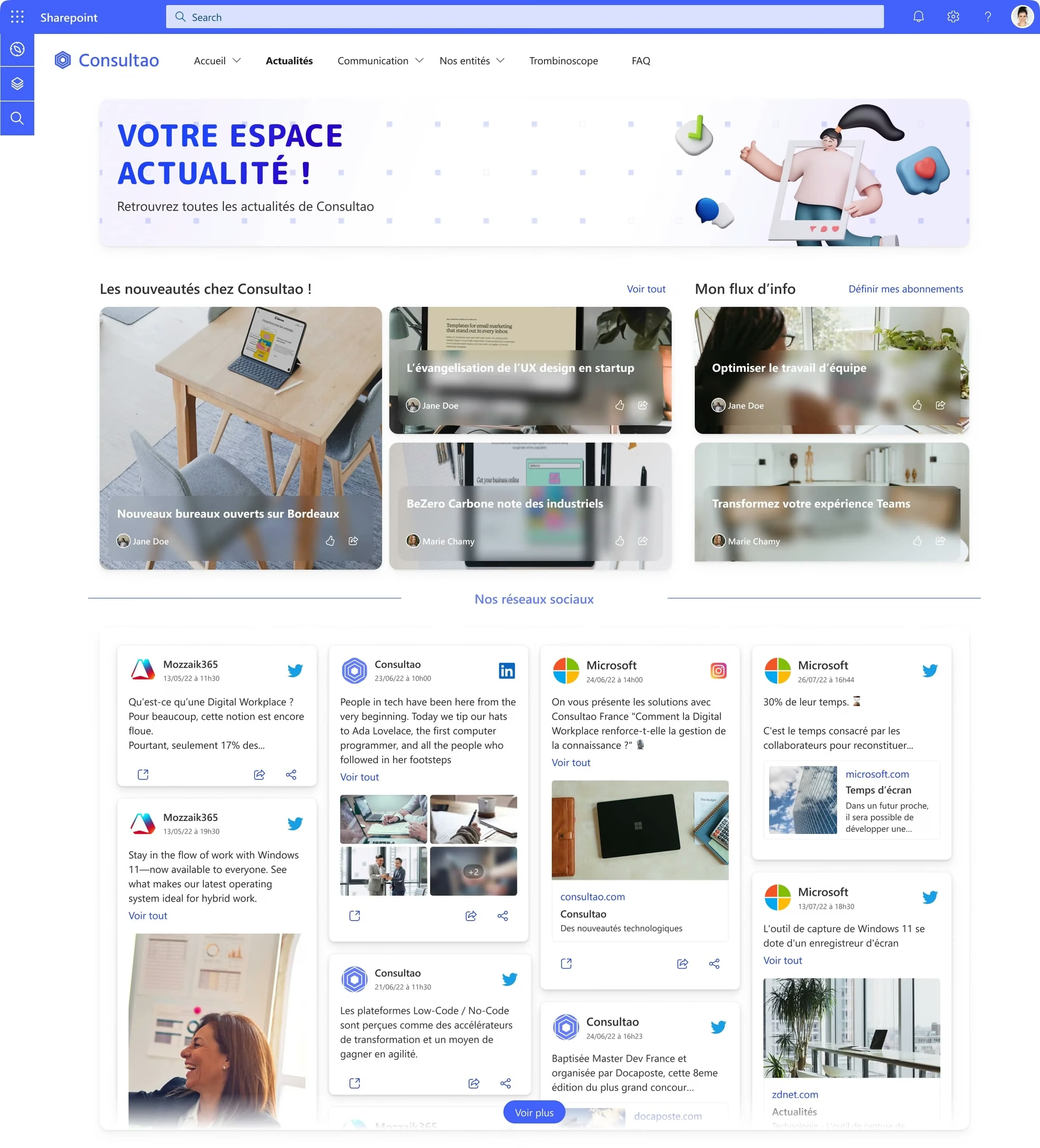
Aggregate the company's social networks
In 2022, according to We Are Social and Hootsuite, 58.4% of the world's population will use social networks. It is therefore likely that your employees are also active on Instagram, Twitter, Facebook or LinkedIn. So why not go on their ground and use this lever to improve your internal communication and boost your external communication?
To do so, add to your corporate intranet a feature aiming at centralizing the contents published on your company's social networks. Employees will thus have an overview of the external communication of your structure. They will also be able to participate in discussions, create engagement around your posts and act as ambassadors of your brand (commercial and employer) on the different platforms. A must.
🚀 To dig into this theme, find out how the "social media wall" feature turns your employees into ambassadors
💡Did you know. According to a study called "Kredible Employee Advocacy Study" and relayed by Influencer Marketing Hub,Employee Advocacy ("employee ambassador" in the text) programs with at least 1,000 active participants could generate up to $1.9 million in advertising value, and at a lower cost! So it would be a shame not to give it a try, for example by using the "News Wall" of the Jint SharePoint .
Ask your employees for their opinion
Let's remember that good internal communication has several dimensions. In particular, it is important to encourage upward communication, i.e. to regularly collect feedback from the teams. This practice allows you to take the pulse of your employees, identify their problems and provide relevant solutions (often inspired by the field!).
If well designed, your corporate intranet can be an effective tool to promote this Bottom-Up approach. The Jint SharePoint can for example be enhanced with features that allow employees to ask for their opinion such as the suggestion box, polls or quizzes.
Offer a corporate social network
Fluid exchanges, a relaxed tone, easy access to information, creation of communities of interest and maximum engagement: social networks have many advantages that have not escaped the attention of large companies. As we explained elsewhere on this blog, 80% of large organizations have already launched their own corporate social network.
To improve internal communication and collaboration within your organization, therefore, consider integrating a "Social Media" feature to your corporate intranet. The Jint SharePoint allows you to add the Viva Engage application to your digital workspace. This way, employees can join interest groups, interact with their peers informally, and ultimately feel more a part of the company.
Advertise job openings within the company
As the specialized media MyRHline points out, internal mobility has several major advantages: it reduces the cost of recruitment, encourages employee commitment and strengthens the employer brand. Encouraging internal mobility within your organization is therefore a winning strategy.
If your corporate intranet is well-thought-out, it can help you in this way. To do so, you just need to add a "job exchange" feature, like the one proposed by Jint. This will allow you to announce open positions in all transparency and to make them known to employees.
Announce the arrival of new employees within the company
According to a study conducted by Deloitte and relayed by LinkedIn, "22% of employee turnover occurs during the first 45 days" after hiring "Which costs the company at least 3 times the salary of the former employee". The conclusion? It is essential to work on the proper integration of new recruits in order to avoid hasty departures and the associated expenses.
Introducing new talent to their colleagues is of course one of the keys to a successful integration. To make this easier, add a new hire announcement feature to your corporate intranet . For example, the Newcomers component of the Jint SharePoint allows you to post a list of recent arrivals to the organization directly to your HR intranet. This way, everyone knows who has just joined the organization and in what position.
Create beautiful feedback pages and practical documentation
As we've seen, 1 in 5 employees say they don't have the information they need to do their jobs. Yet, according to a study entitled "Time Searching for Information" by McKinsey, employees spend an average of 1.8 hours per day searching. There is therefore an urgent need to improve knowledge management and accessibility.
In this perspective, your corporate intranet can be a precious ally, as long as you add the right features. To exploit its full potential, allow employees to create clear and readable documentation in a few clicks. Better yet, allow employees to make this information accessible to everyone by saving it on your private network. This way, the knowledge will be saved and can be exploited:
- by newcomers in the process of Onboarding,
- by employees who replace an absent person,
- by employees who are embarking on a similar project,
- to identify good practices to spread throughout the organization,
- to take a step back from existing processes and improve them,
- to identify experts to consult on certain technical topics.
☝️ Attention, to bear all its fruits, this feature must be coupled with a powerful search tool. This will indeed allow everyone to easily find the data they need. The Jint SharePoint thus offers a complete knowledge management system that gathers knowledge, simplifies its distribution, connects employees and integrates a search engine.
In practice, this works best as a shortcut rather than a blank page: employees pick a template built by the intranet administrator and fill it in. Jint's "contribution aid" component does exactly that, feeding your CMS with ready-made article templates so good documentation stops depending on who happens to be a strong writer.
Allow employees to personalize the news they receive
Employees are both overwhelmed by the amount of information available and uninformed. Targeting messages to employees based on their profile is part of the solution to this problem. The other part is allowing employees to select the topics they want to be informed about.
To do so, make sure to integrate an ad hoc feature to your corporate intranet. With the Jint SharePoint, for example, each employee can personalize their "News Wall" by subscribing to the themes of their choice. This way, everyone is exposed to the news that interests them and is more satisfied with internal communication.
Highlight company events
Whether it's a conference, seminar, cultural visit, welcome lunch, after-workparty or team building course, corporate events bring employees together and strengthen team cohesion. It is therefore essential to organize such events from time to time and to make them known to employees in order to facilitate their participation.
As a first-rate internal communication lever, your company intranet can of course be used for this purpose. The Jint SharePoint offers an "Event Manager" component that allows you to post upcoming events, but also to target each of them to a specific audience. Thanks to this feature, it is for example possible to "push" an integration course specifically to newly recruited talents.
Add a powerful search engine
Documented knowledge only pays off if people can actually find it. An advanced search engine is what turns a document library from a dumping ground into shared memory.
Jint lets you tag content, attach metadata and authors, and surface results through precise filters instead of one long list. Employees search once and land on the right file, not twenty near-misses.
Two effects follow directly: teams get real hours back every week, and the people who wrote the documentation stop being interrupted to explain what's already written down.
Give employees a personal dashboard
A personal dashboard should be the first thing an employee sees when they open the intranet in the morning: their tasks, meetings, news and shortcuts, in one place.
With Jint's Dashboard, admins combine Web Parts and assign them to specific profiles, so a salesperson and a factory manager don't see the same tiles. Microsoft went the same way with Viva Connections' dashboard module in Teams, proof that the feature has become a baseline expectation rather than a nice-to-have.
The payoff: fewer tabs open, one less place to get lost in, and a Digital Workplace that finally starts where the employee's day starts.
Make the intranet accessible to everyone
An intranet only works if everyone can actually use it, regardless of language, disability or comfort with computers. A handful of features decide whether that's true:
- a translation layer so content reads naturally in each employee's language;
- an accessibility checker, such as Microsoft's, run against every published page;
- subtitles on videos and transcripts on podcasts;
- an interface simple enough for the least tech-savvy employee to use unaided;
- a mobile-first experience for people who never sit at a desk.
Skip this and you're not building an intranet for the company. You're building one for the half of it that's already comfortable with software.
Host the intranet in the cloud
A modern intranet has to be reachable from anywhere and safe wherever it's reached from. That means hosting it in the cloud rather than on an internal server nobody can reach remotely.
On SharePoint, employees connect securely from any device and keep working outside the office, backed by security standards Microsoft updates continuously. As an add-in, Jint SharePoint never touches that boundary: Jint holds no sensitive data and documents stay in the customer's tenant.
Practically, that's the difference between an intranet that survives a laptop left at home and one that grinds a team to a halt.
Summary: the 20 intranet features at a glance
To keep the big picture in mind while writing your specifications, here are the 20 features covered in this article, with their category and what they bring.
Before configuring anything, sketch your intranet information architecture around employees' tasks, not the org chart.
The last word...
As you can see, there are many features that make a corporate intranet effective and attractive. But these features are only valuable because of the benefits they unlock for an intranet.
It is up to you to choose, among the features presented above, and among all the other existing options, those that best meet the needs expressed by your employees.
Before finalizing your selection, it’s helpful to know how much an intranet costs, depending on the deployment model and the desired level of customization.
To guide you in the development of your intranet, do not hesitate to be accompanied by an integrator, but also to rely on our downloadable Template of specifications.
It's up to you!


