





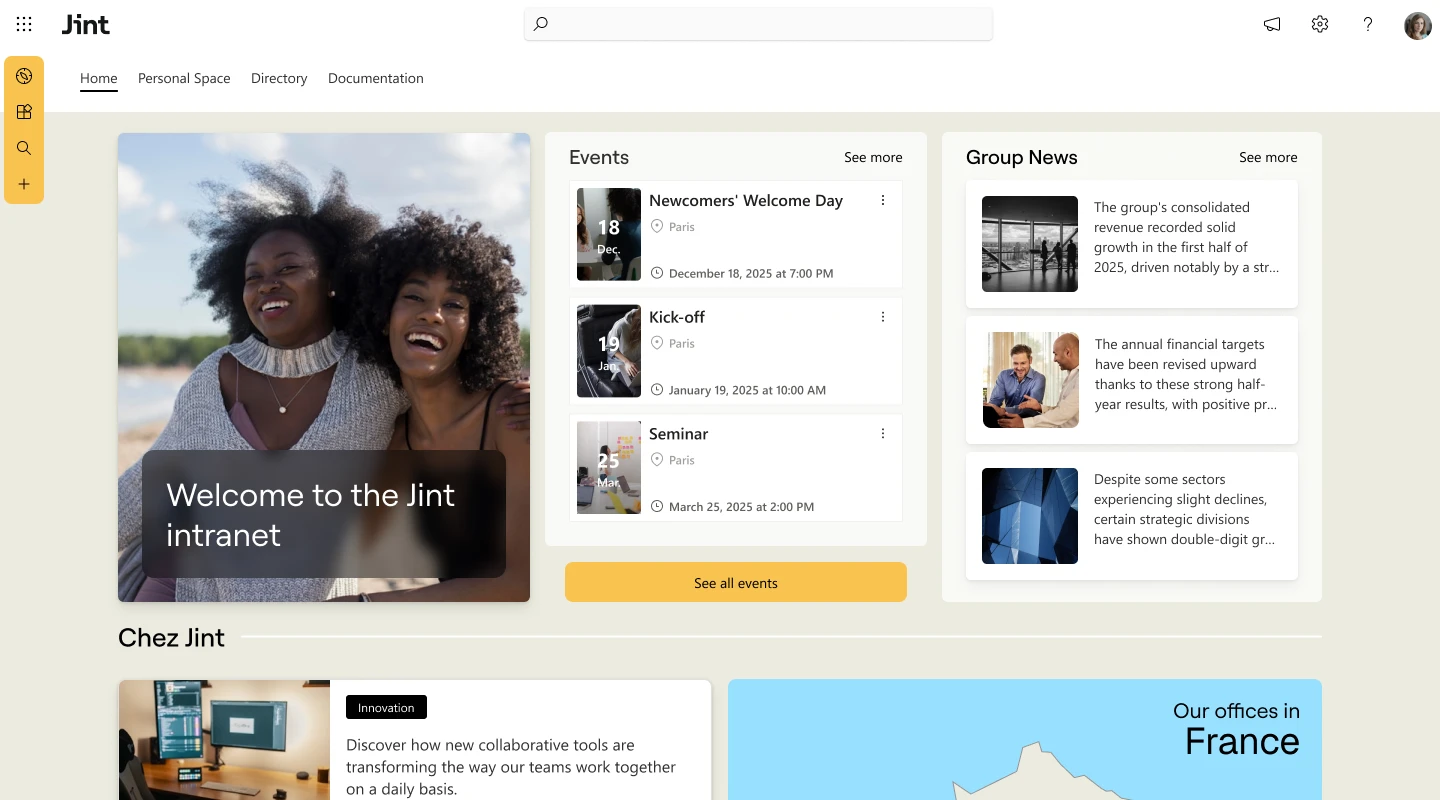
Ask ten employees what the intranet is and you will hear ten answers: "the HR portal", "SharePoint", "that page nobody updates". They are all partly right, and none of them fully answers the question "what is an intranet?". This guide explains how an intranet works, the types available, what real organizations do with theirs and how to build one that people use. We are the Jinters, and for eight years we have built intranets on Microsoft 365, from a 300-employee Canadian city to international groups. What follows comes from those projects.
What is an intranet?
Intranet definition: an intranet is a private website reserved for a company's employees, where they read internal news, find documents and policies, access business tools and connect with colleagues. Technically, it is a private network, usually delivered as a secure website, built with the same technologies as the public internet (browsers, web pages, search) but placed behind the company login.
How the intranet meaning has changed
The intranet meaning has shifted over thirty years. In the 1990s, an intranet was a set of static pages hosted on a server in the building. Today, the same word describes a cloud platform that personalizes content for each employee, works on a phone and plugs into email, chat and HR software. The two notions are often confused, but they are not the same: the intranet is one component of the digital workplace, which also covers email, chat, meetings, document collaboration and business applications. A modern intranet often serves as its entry point.
What is a company intranet used for?
A company intranet, also called a corporate intranet or employee intranet, serves the whole organization rather than a single team. In practice, employees use it to:
- read company news and announcements targeted to their team, site or country;
- find documents, policies and procedures in their latest version;
- look up a colleague in the people directory and see who does what;
- complete everyday tasks: request leave, open an IT ticket, order equipment;
- follow an onboarding path during their first weeks;
- share knowledge, comment on posts and take part in surveys;
- open the business applications they use daily from a single entry point.
A short history of the intranet
According to researchers Anne-Pauline Garbar and Magali Véran, the word "intranet" first appeared in the press around 1992, and Forrester Research formalized the idea of a "full service intranet" in 1996. By 2000, 64.3% of the 1,500 largest French companies already had one, according to a Union des Annonceurs study.
The first intranets were broadcast channels: management published, employees read. Each wave since then has added a layer. Collaboration and document management came with SharePoint in the 2000s. Social features (comments, communities, likes) followed in the 2010s, then mobile access for frontline teams. The current wave is AI: assistants that answer employee questions using the content stored in the intranet. We trace that shift in the evolution from an intranet to an employee experience platform.
How does an intranet work?
An intranet works like a website with a guest list. Six building blocks make it run:
- Identity. Employees sign in with their work account through single sign-on. On Microsoft 365, that account lives in Microsoft Entra ID, the same identity used for Outlook and Teams.
- Permissions. Access rights decide who can open each site, page or document. HR files stay restricted to HR, whatever the home page displays.
- Audience targeting. Targeting decides what each employee sees first: a local announcement on one site, a policy update for managers only. Targeting personalizes the display, it does not protect content. Microsoft states it plainly for SharePoint: a person outside the audience can still find the page through search if they have access to it.
- Content. News, pages, documents and lists, published by the communications team and by contributors in each department.
- Search. A search engine indexes pages, files and people, so employees type a question instead of browsing folders.
- Integrations. Connections to the tools people already use (Teams, Outlook, HR and ticketing software) turn the intranet into the front door rather than one more app.
Where does it live? Older intranets were installed on company servers (on-premises). Most organizations now run theirs in the cloud, either as a standalone SaaS platform or inside Microsoft 365, where SharePoint stores the content and Teams or a mobile app delivers it. Microsoft's own documentation presents SharePoint sites, hubs and news as the backbone of what it calls an intelligent intranet. For concrete layouts, browse these SharePoint communication site examples.
The architecture matters less than one rule: the intranet must sit where employees already work. In the projects we see, an intranet that requires a separate login, a separate app and a separate habit tends to lose out to the email inbox.
Intranet vs internet vs extranet: what is the difference?
The three words share the same technology but not the same audience. The internet is public, the intranet is reserved for employees, and the extranet opens part of the intranet to selected outsiders such as partners, suppliers or clients.
Want the details, including how to secure external access on Microsoft 365? Read our guide to intranet vs extranet.
What is the role of a company intranet? 6 jobs it should do
A corporate intranet is not a website for its own sake. It earns its place by doing six jobs better than email, shared drives and scattered tools.
Inform every employee, not only those at a desk
Email reaches people who live in their inbox. An intranet can reach everyone, including employees in stores, plants or on the road, as long as it works on mobile. Gartner estimates that there are 2.7 billion frontline workers worldwide, more than twice the number of desk-based workers. Targeted news by site, job or language, combined with push notifications, is what makes the intranet visible to them. Our guide to frontline intranet adoption details six proven tactics.
Find information in seconds
This is the most underrated job. Gartner's 2023 Digital Worker Survey found that 47% of digital workers struggle to find the information or data they need to do their job effectively. The same survey found that the average knowledge worker uses 11 applications, up from 6 in 2019. A good intranet gives one entry point and one search bar across pages, files and people. Our guide to Microsoft tools for knowledge management explains how to organize that knowledge, and the hidden cost of searching puts a figure on the problem.
Share culture and strategy
Values on a poster do not change behavior. Stories do. The intranet is where leadership explains its decisions, teams celebrate their wins and new joiners discover how the company really works. It is also where engagement becomes measurable: views, reactions, comments, survey answers, all signals of the wider employee experience.
The stakes are not cosmetic. According to Gallup's State of the Global Workplace 2025 report, the share of engaged employees worldwide fell from 23% to 21% in 2024, a drop Gallup estimates cost the world economy US$438 billion in lost productivity. Well-run internal communication is one of the levers organizations use to address it, and the intranet is where much of it happens.
Onboard new employees faster
A new hire's first weeks shape how long they stay. The intranet structures that period: an onboarding path, the company directory, the key policies, the first trainings. HR stops answering the same ten questions by email. See how in our guide to the HR intranet.
Connect teams across sites and languages
Multi-site and international organizations use the intranet to give each entity its own space while keeping one shared culture. Automatic translation removes the language barrier. At Nhood, content appears in each user's language across 11 countries. Our guide to the multilingual intranet explains how to set it up on SharePoint, and one intranet, ten sites: who publishes what? covers the governance side.
Protect company information
Access depends on identity and permissions, so an intranet can be easier to control than files scattered across shared drives and email attachments. It is only as secure as its configuration, though: permissions, external sharing settings and governance decide the real level of protection. On Microsoft 365, content stays in the company's own tenant, under the security and compliance rules IT already manages. Our intranet security best practices cover the essentials.
What are the different types of intranet?
Not all intranets are built the same way. Six families cover most of the projects we see in 2026:
For each option's real costs and trade-offs, see our deep dives on CMS intranets, open-source intranets, mobile vs traditional intranets and why companies migrate to a SaaS intranet.
Our view, from the projects we run: if your organization already relies on Microsoft 365, building the intranet inside it is usually the shortest path. Identity, permissions and documents are already in place, so you add an experience layer rather than a new silo. It is not the right answer for every organization, as the section on choosing a platform explains. To weigh native SharePoint against an extension, read SharePoint intranet: build or buy?. We explain the reasoning in why choose SharePoint for your intranet.
What are the benefits of an intranet?
The benefits of an intranet show up in time saved, engagement gained and costs avoided. Five of them carry most business cases:
- Save time on information search. McKinsey estimated that employees spend nearly 20% of their working time looking for internal information or tracking down colleagues, and that social technologies can cut that search time by up to 35% (2012).
- Raise productivity. The same McKinsey research found that better communication and collaboration can lift knowledge-worker productivity by 20 to 25%.
- Reduce interruptions. Microsoft's 2025 Work Trend Index found that the most solicited 20% of Microsoft 365 users receive a meeting invite, email or chat every two minutes on average over an eight-hour workday. Published, searchable information replaces part of that noise.
- Engage and retain employees. A visible, two-way channel gives every employee a voice and a clear view of where the company is going.
- Cut tool and maintenance costs. Consolidating portals, newsletters and shared drives into one platform reduces licenses and upkeep.
We detail each of them, with figures and examples, in the 12 benefits of a company intranet. To put a number on your own case, try our intranet ROI simulator.
What are the essential features of an intranet?
In our experience, eight features weigh most on how a modern intranet is judged by its users. Their relative importance depends on the organization: a frontline workforce will value the mobile app first, an international group the multilingual content.
Need the full checklist? Browse our 16 enterprise intranet features. Jint SharePoint adds more than 60 ready-to-use features of this kind to SharePoint and Teams, and Jint Mobile App brings them to frontline employees.
Company intranet examples
Definitions only go so far. Here is what a corporate intranet looks like in three organizations of very different sizes, followed by a closer look at a fourth:
- City of Westmount(Canada, 300 employees). The city replaced a WordPress intranet it considered insufficiently secure with an intranet integrated into Microsoft 365. HR and communications now publish without depending on IT.
- Nhood(1,300 employees, 11 countries). Content is displayed automatically in each user's language, and 70 contributors manage their local pages on their own.
- MFR(10,500 employees, 420 training centers). 25 employee ambassadors joined 8 workshops to design the intranet, and the communications and legal teams now run all updates independently.
A closer look: how Bouygues Group replaced its intranet in four months
The context. Bouygues is a French industrial group present in more than 80 countries, with five business lines: construction, telecommunications, media, energy and services. In 2020, the group decided to retire an aging intranet that made publishing slow and inefficient.
The selection criteria. After evaluating several market solutions, the group chose Jint on four criteria: strong integration with Microsoft 365, branding options for each entity, high cybersecurity standards (a priority after a cyberattack on one of its subsidiaries) and the ability to replicate content across subsidiaries, validated through a proof of concept.
The scope. Two communication intranets: the Group portal and the intranet of the Bouygues SA holding company, with the goal of distributing corporate news automatically to the five business intranets (Bouygues Construction, Colas, Bouygues Immobilier, TF1 and Bouygues Telecom).
The result. Both intranets went live in four months, with a project run entirely remotely. A few months after launch, users rated the new intranets 8.5/10 on average.
For more inspiration by use case, explore our 14 corporate intranet examples and SharePoint intranet examples, or download the intranet lookbook.
Why do intranets fail? 4 real risks
Let's be honest: many intranets disappoint. Not because the idea is wrong, but because of four avoidable traps. Each one has a fix.
Adding one more tool to a crowded stack
Knowledge workers already juggle 11 applications on average (Gartner, 2023). An intranet that lives outside the tools they use becomes the twelfth. The fix: run it inside Microsoft Teams and the existing Microsoft 365 environment, so it reduces the number of entry points instead of adding one.
Paying for a platform nobody opens
An unused intranet is a budget line with no return. Adoption comes from useful content, targeted news and a mobile experience, not from a launch email. We analyze the causes in why intranets fail employee engagement and share 9 content ideas that keep employees coming back.
Accumulating technical debt
Custom-built intranets tend to age fast. Platform updates, security patches and new needs regularly turn into development work that the organization has to fund and schedule. A SaaS solution shifts most of that maintenance to the vendor, who runs the infrastructure and ships updates. For an intranet built on Microsoft 365, such as one using Jint SharePoint, Microsoft hosts the underlying platform and the vendor maintains the features it adds, including AI.
Launching a project that drags on
Custom builds often run for many months, and sponsors move on in the meantime. Ready-to-use solutions shorten that cycle: Bouygues delivered two intranets in four months.
How to create a company intranet in 7 steps
In our experience, intranet projects succeed or fail on method far more often than on technology. Here are the seven steps we follow with our clients:
- Audit the existing situation. List current channels, tools and pain points. Ask employees what they search for and fail to find.
- Set measurable goals. For example: cut HR emails by 30%, reach 80% of frontline staff every week, halve the time spent searching.
- Write the specifications. Formalize audiences, features, technical constraints, budget and timeline. Our free intranet specifications template saves weeks of work.
- Choose the platform. Compare native, extension and standalone options on integration, security, cost and time to deploy (see the next section).
- Design with your users. Build the information architecture and the home page with a panel of ambassadors from every department, as MFR did.
- Launch and train contributors. Prepare launch content, train each department's contributors and plan an internal campaign.
- Measure and improve. Track reach, search success and feedback every month, then adjust. Our intranet optimization guide lists the KPIs to follow.
Building on Microsoft 365? Follow our step-by-step guide to create a SharePoint intranet. Replacing an old intranet? Our intranet redesign plan covers budget and timeline, and our intranet cost guide details prices and hidden costs.
How to choose the right intranet platform
The best intranet is the one that fits your environment and your people, not the one with the longest feature list. Ask these six questions before you sign, then go further with our 40 questions to ask before you choose your intranet:
To compare vendors side by side, read the best intranet software in 2026. Public organizations will also find specific advice in how to set up an intranet in the public sector.
When another option fits better than a Microsoft 365 intranet
We build intranets on Microsoft 365, and we tell prospects when it is not the right fit. Another route usually makes more sense when:
- most of your workforce has no Microsoft 365 account and never works in it: a standalone platform or a mobile-first employee app will reach them more easily;
- your company runs on Google Workspace: choose a platform built for that environment;
- you have a small team, SharePoint skills in-house and simple needs: native SharePoint communication sites may be enough;
- what you actually need is a public website or a customer portal: that is a website or extranet project, not an intranet.
The intranet in the AI era: why structure comes first
Microsoft 365 Copilot, SharePoint agents, intranet chatbots: AI features in a growing number of digital workplace roadmaps. Here is our position: a well-structured intranet is the foundation that makes AI assistants more reliable.
The answers of an AI agent depend heavily on the information it reads. Scattered, outdated or poorly governed content leads to wrong answers, old policies quoted as current, or no answer at all. A good intranet does the groundwork: it organizes knowledge, keeps it up to date, gives every page an owner and applies permissions. This improves the reliability of an agent's answers, but it does not remove errors altogether: answers still need to be tested before a rollout, sources must stay visible to users, and permissions must be reviewed so that the agent only surfaces content each person is allowed to see.
So the order matters. Before rolling out agents, put the house in order. The intranet is not the competitor of AI, it is its foundation. This is the approach behind Jint AI, our AI assistants, which rely on structured Microsoft 365 content. Where do you stand today? Our free AI-Ready Index scores your digital workplace in five minutes.
About the author
Florian Bouron is President of Jint (formerly Mozzaik365), a Microsoft partner that has designed and deployed Microsoft 365 intranets for organizations in France and Canada for eight years.
Explore our intranet guides
This page is the starting point of our intranet guide. Go deeper on each topic:
Understand
- The 12 benefits of a company intranet
- 16 enterprise intranet features
- Intranet vs extranet
- Social intranet: the complete guide
- Mobile vs traditional intranet
- 10 intranet trends for 2026
Choose
- Best intranet software in 2026
- How much does an intranet cost?
- CMS intranet comparison
- Open-source intranet options
- Why migrate to a SaaS intranet
- Intranet security best practices
Build and improve
- Create a SharePoint intranet
- Build a communication intranet in 6 steps
- Intranet redesign: plan and budget
- Intranet optimization guide
- Why intranets fail employee engagement
- Frontline intranet adoption




.webp)

.jpeg)


